Deploying on Google Cloud
This guide shows how to run HaltSQL on Google Cloud with keyless
authentication (Workload Identity and the metadata server), secrets in Secret
Manager, a write-once audit trail in Cloud Storage, and traces and metrics in
Cloud Trace and Cloud Monitoring. The manifests it refers to are in
deploy/cloud/gcp/.
Read deployment.md first for the general model. In short:
haltsql-server only answers "is this SQL allowed?" and never connects to the
database; the agent runs the exact SQL it verified. haltsql-proxy sits in
front of PostgreSQL and enforces the answer itself.
| Pattern | Runs on | Use it when |
|---|---|---|
| GKE sidecar | GKE (Standard or Autopilot) | Your agents run on GKE. One haltsql-server per agent pod, on 127.0.0.1. The default recommendation. |
| GKE shared service | GKE, Helm chart | Many agents, central policy management, Google ID tokens instead of shared secrets. |
| Cloud Run | Cloud Run | Your agents run on Cloud Run: either a sidecar container in the agent's service, or one internal haltsql service shared by several agents. |
| Proxy in front of Cloud SQL | GKE | You cannot change the client (BI tools, vendor agents), or you do not trust the application to honor verdicts. |
Whatever you pick, keep the database-side controls of defense-in-depth.md: a least-privilege database role and row-level security on Cloud SQL.
Terraform. To provision these patterns as code, use the modules in
deploy/terraform(terraform.md):haltsql-gcprunshaltsql-serveron Cloud Run, andhaltsql-kubernetesinstalls the Helm chart on any cluster. This guide explains the architecture and the settings those modules expose; the manifests indeploy/cloud/gcp/are the equivalent by hand.
How HaltSQL gets Google credentials
HaltSQL calls two Google APIs: Secret Manager (to resolve ${gcp-sm:...}
placeholders when the config loads) and Cloud Storage (the gcs audit sink).
Both use an OAuth2 access token with the cloud-platform scope, cached and
refreshed 60 seconds before it expires. The token comes from:
| Caller | Source, in order |
|---|---|
${gcp-sm:...} resolver | GOOGLE_APPLICATION_CREDENTIALS if set (a service-account key JSON file), otherwise the metadata server. |
gcs audit sink | credentials.source in the sink config: metadata (default) or service_account_file with file. It does not read GOOGLE_APPLICATION_CREDENTIALS. |
The metadata server is http://metadata.google.internal (override with
GCE_METADATA_HOST). HaltSQL sends Metadata-Flavor: Google and rejects a
response that does not carry the same header. On GKE with Workload Identity
the GKE metadata server answers with the token of the Google service account
(GSA) bound to the pod's Kubernetes service account (KSA). On Cloud Run it
answers with the token of the revision's service account.
Use the metadata server everywhere on Google Cloud. Do not create
service-account keys. The key-file option exists for running outside Google
Cloud; HaltSQL does not support Workload Identity Federation credential
configuration files ("type": "external_account"), so outside Google Cloud a
key is currently the only way (see Limitations).
haltsql-proxy makes no Google API calls. Its secrets reach it as files
(${file:...}).
Prerequisites
- A project with billing, and
gcloudauthenticated as someone who can create service accounts, secrets and buckets and grant IAM roles on them. - For GKE: a cluster with Workload Identity Federation for GKE enabled
(Autopilot enables it by default; on Standard,
gcloud container clusters update CLUSTER --workload-pool=PROJECT_ID.svc.id.googand node pools with--workload-metadata=GKE_METADATA). Native sidecars (used by the manifests) need GKE 1.29 or later. - A Cloud SQL for PostgreSQL instance with private IP only in the same
VPC (Private Services Access), and IAM database authentication enabled
(
cloudsql.iam_authentication=on) if the agent logs in as its service account. - The tools:
gcloud,kubectl,helm(shared service),openssl.
Enable the APIs and create the audit bucket once per project:
export PROJECT_ID=my-project REGION=europe-west1
deploy/cloud/gcp/iam/setup.sh apis
deploy/cloud/gcp/iam/setup.sh audit-bucket   # bucket with an (unlocked) retention policy
setup.sh has one subcommand per pattern. Each creates the service account,
secrets and IAM bindings that pattern needs and nothing else. Read a
subcommand before running it in production.
Pattern 1: GKE sidecar
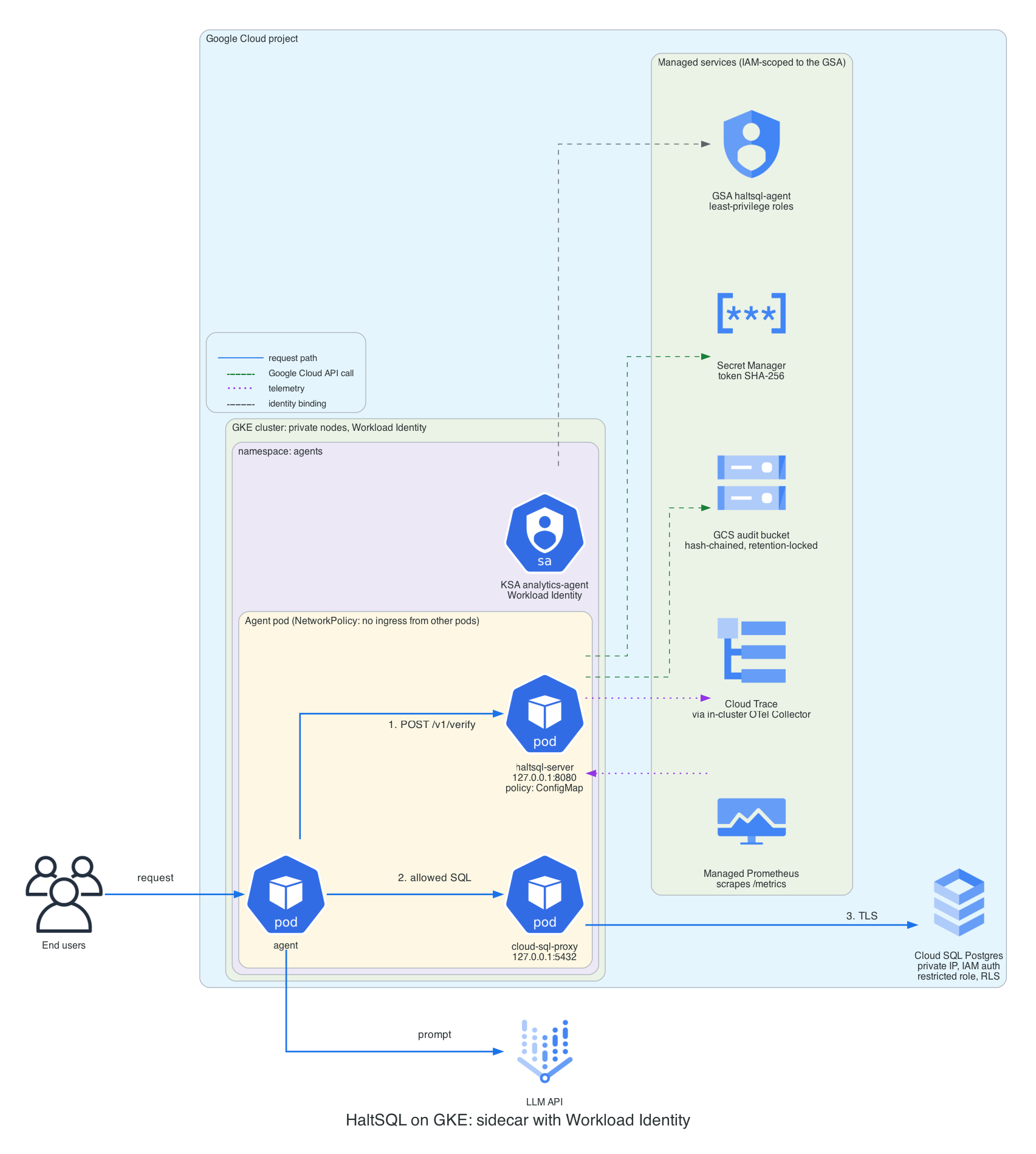
The agent pod has three containers:
- agent: your code. It calls
http://127.0.0.1:8080/v1/verifyand runs only allowed SQL. - haltsql (native sidecar, starts first):
haltsql-serverwith the policy from a ConfigMap. The token hash comes from Secret Manager; audit batches go to GCS; spans go to an OpenTelemetry Collector; Managed Service for Prometheus scrapes/metrics. - cloud-sql-proxy (native sidecar): the Cloud SQL Auth Proxy on
127.0.0.1:5432, connecting to the instance's private IP with IAM database authentication.haltsql-servernever uses it.
The KSA analytics-agent is annotated with
iam.gke.io/gcp-service-account: haltsql-agent@PROJECT_ID.iam.gserviceaccount.com,
and that GSA holds exactly the roles in the IAM reference.
Steps
-
Create the GSA, secrets and bindings. This generates a random token, stores it in secret
haltsql-analytics-agent-token(for the agent) and its SHA-256 inhaltsql-analytics-agent-token-sha256(for haltsql). The token is never printed.deploy/cloud/gcp/iam/setup.sh gke-sidecardeploy/cloud/gcp/iam/setup.sh collectorThe Workload Identity binding it creates is:
gcloud iam service-accounts add-iam-policy-binding \haltsql-agent@$PROJECT_ID.iam.gserviceaccount.com \--role roles/iam.workloadIdentityUser \--member "serviceAccount:$PROJECT_ID.svc.id.goog[agents/analytics-agent]" -
Fill in the manifests and apply them:
grep -n REPLACE_ME deploy/cloud/gcp/gke/sidecar.yaml deploy/cloud/gcp/gke/otel-collector.yamlkubectl apply -f deploy/cloud/gcp/gke/otel-collector.yamlkubectl apply -f deploy/cloud/gcp/gke/sidecar.yaml -
Check that haltsql loaded its policy and can write audit objects:
kubectl -n agents logs deploy/analytics-agent -c haltsql | headkubectl -n agents port-forward deploy/analytics-agent 8080:8080 &curl -s localhost:8080/readyzcurl -s localhost:8080/metrics | grep haltsql_audit_sink_healthy
The haltsql part of the config (in the ConfigMap):
server:
  auth:
    tokens:
      - name: analytics-agent
        token_sha256: ${gcp-sm:haltsql-analytics-agent-token-sha256}
        policy: analytics-agent
audit:
  sinks:
    - type: gcs
      bucket: ${env:HALTSQL_AUDIT_BUCKET}
      prefix: haltsql/audit/analytics-agent/
      credentials: { source: metadata }
      spool_dir: /var/spool/haltsql
      on_error: fail_closed
telemetry:
  metrics: { prometheus: true }
  otlp:
    endpoint: http://otel-collector.observability.svc.cluster.local:4318
    service_name: haltsql-analytics-agent
    metrics: false
secrets:
  gcp:
    project: ${env:GCP_PROJECT}
The pod identity is shared by all three containers, so the agent can also
create objects in the audit bucket. It cannot read, overwrite or delete any
(the role is roles/storage.objectCreator and objects are create-only), and
objects that do not continue the chain stand out when you verify it. If
that is not acceptable, use the shared service,
which has its own identity.
Pattern 1b: shared service on GKE
The Helm chart in deploy/helm/haltsql runs a
haltsql-server Deployment behind a Service. On GKE the cleanest
authentication is Google-signed ID tokens: each agent asks its own
metadata server for an ID token with audience haltsql, and haltsql verifies
it as an OIDC token from https://accounts.google.com. No secret is shared or
rotated.
values-gke.yaml sets, among other things:
serviceAccount:
  name: haltsql
  annotations:
    iam.gke.io/gcp-service-account: haltsql-server@PROJECT_ID.iam.gserviceaccount.com
  automountServiceAccountToken: false
oidc:
  - name: google-analytics-agent
    issuer: https://accounts.google.com
    audiences: [haltsql]
    algorithms: [RS256]
    policy: analytics-agent
    required_claims:
      sub: "112233445566778899000"    # unique ID of the agent's GSA
    request_context_fields: [tenant_id]
- Add one
oidcentry per calling GSA. Entries with the same issuer are tried in order, and the first that accepts the token decides the policy. Pin onsub, the GSA's numeric unique ID (gcloud iam service-accounts describe EMAIL --format='value(uniqueId)').emailis only in the token when the caller requestsformat=full. - Agents on GKE should use the GSA annotation on their KSA: ID tokens from the metadata server are issued for the impersonated GSA. Check that your setup issues them before relying on direct principal bindings without a GSA.
- Google ID tokens carry no tenant, so
request_context_fields: [tenant_id]lets the calling service supply it from its own session, exactly as with a static token. If the tenant must come from the identity, use one GSA per tenant, or mTLS identities with a staticcontext.
In the agent, fetch and cache the token (it is valid for one hour):
import google.auth.transport.requests
import google.oauth2.id_token

token = google.oauth2.id_token.fetch_id_token(
    google.auth.transport.requests.Request(), "haltsql")
Steps:
deploy/cloud/gcp/iam/setup.sh gke-shared
kubectl create namespace haltsql
# TLS: a kubernetes.io/tls Secret named haltsql-tls (cert-manager, Google CAS, ...)
helm upgrade --install haltsql deploy/helm/haltsql -n haltsql \
  -f deploy/cloud/gcp/gke/values-gke.yaml \
  --set-file 'policies.analytics-agent\.yaml=policies/analytics-agent.yaml'
kubectl apply -n haltsql -f deploy/cloud/gcp/gke/shared-extras.yaml
The chart's NetworkPolicy denies all egress by default. values-gke.yaml
opens DNS, TCP 443 (GCS and Google's JWKS), the GKE metadata server and the
collector. Keep server.port: 8080: the image sets
HALTSQL_LISTEN=0.0.0.0:8080, which outranks the listen address the chart
writes into the config, so change the Service port instead.
Pattern 2: Cloud Run
Cloud Run can pull images only from Artifact Registry, Container Registry and Docker Hub. Mirror the image through an Artifact Registry remote repository first:
deploy/cloud/gcp/iam/setup.sh image
# image: $REGION-docker.pkg.dev/$PROJECT_ID/ghcr/haltsql/haltsql:0.0.1
Settings that matter on Cloud Run, for both variants:
run.googleapis.com/cpu-throttling: "false"(instance-based billing). The GCS sink closes batches and retries uploads in the background, and the OTLP exporter sends spans in the background. With request-based billing, CPU is throttled between requests and both stall until the next request.- Spool directory. Cloud Run has no persistent disk; the manifests use an
in-memory
emptyDir. It protects records across a container restart within an instance, but each new instance starts a new chain. Verify each run's objects on its own (see Audit). OnSIGTERM, haltsql flushes the open batch before exiting, within Cloud Run's 10-second shutdown window. - Configuration is mounted from Secret Manager (
config.yaml, policies) or a read-only Cloud Storage volume (signed bundles). Setreload.watch: falseand roll out changes as new revisions: each revision then pins one config version, which is what you want for audits.
2A: sidecar in the agent's service
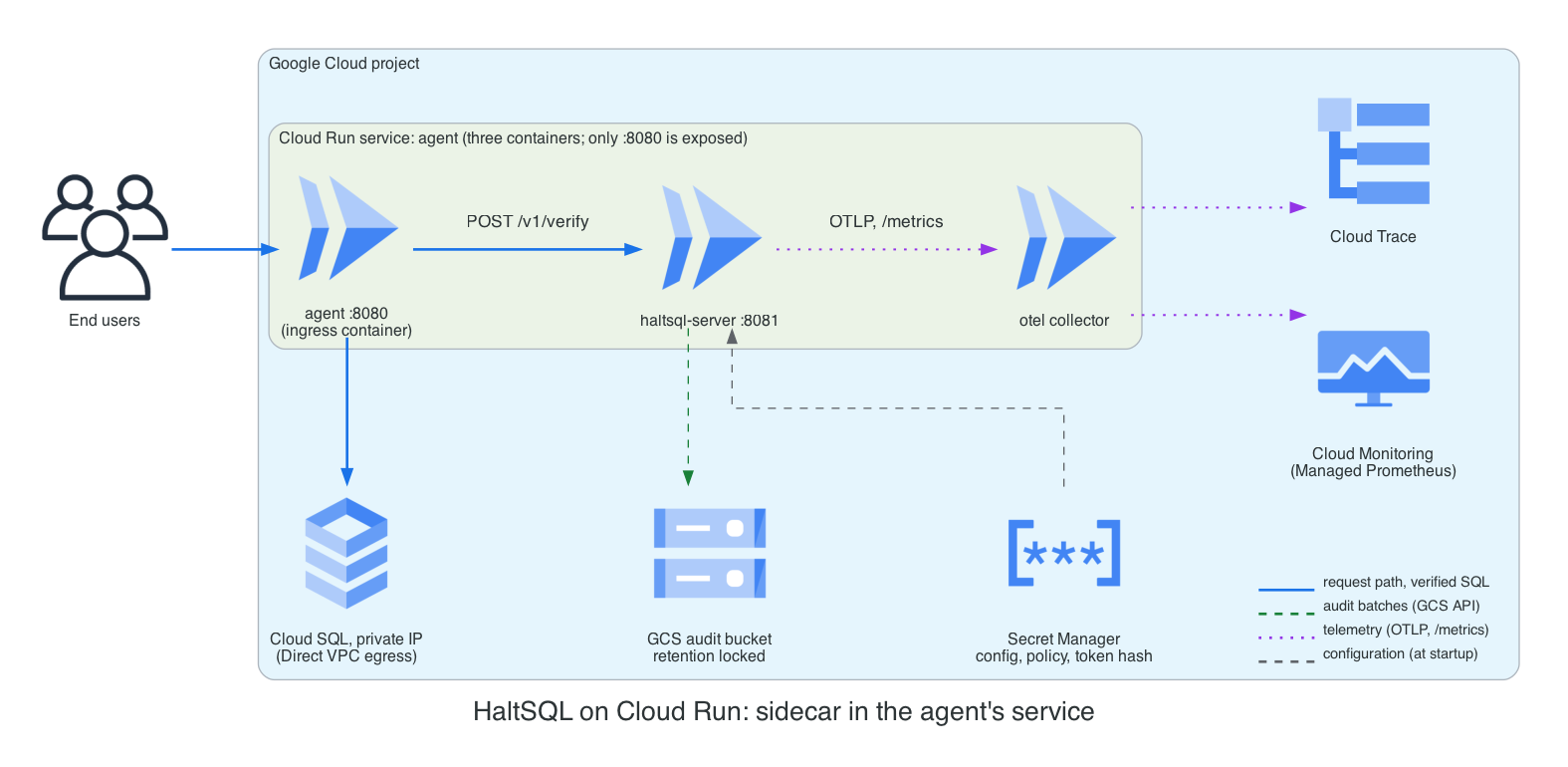
cloudrun/service-sidecar.yaml
has three containers: agent (the ingress container, port 8080), haltsql
(listening on 0.0.0.0:8081; only the ingress container's port is reachable
from outside the instance) and otel-collector.
run.googleapis.com/container-dependencies starts haltsql, and waits for its
startup probe on /readyz, before the agent.
export POLICY_FILE=policies/analytics-agent.yaml
deploy/cloud/gcp/iam/setup.sh cloud-run-sidecar     # SA, token, config/policy secrets, IAM
gcloud run services replace deploy/cloud/gcp/cloudrun/service-sidecar.yaml --region $REGION
The agent receives its raw token from Secret Manager as HALTSQL_TOKEN
(secretKeyRef), and haltsql receives the hash as HALTSQL_TOKEN_SHA256,
used by token_sha256: ${env:HALTSQL_TOKEN_SHA256}. Both are resolved by
Cloud Run when the instance starts.
The collector config
(otel-collector-config.yaml)
receives spans on localhost:4318 and scrapes localhost:8081/metrics, so
the haltsql_audit_sink_* gauges (which OTLP does not carry) reach Managed
Service for Prometheus too.
2B: shared internal service
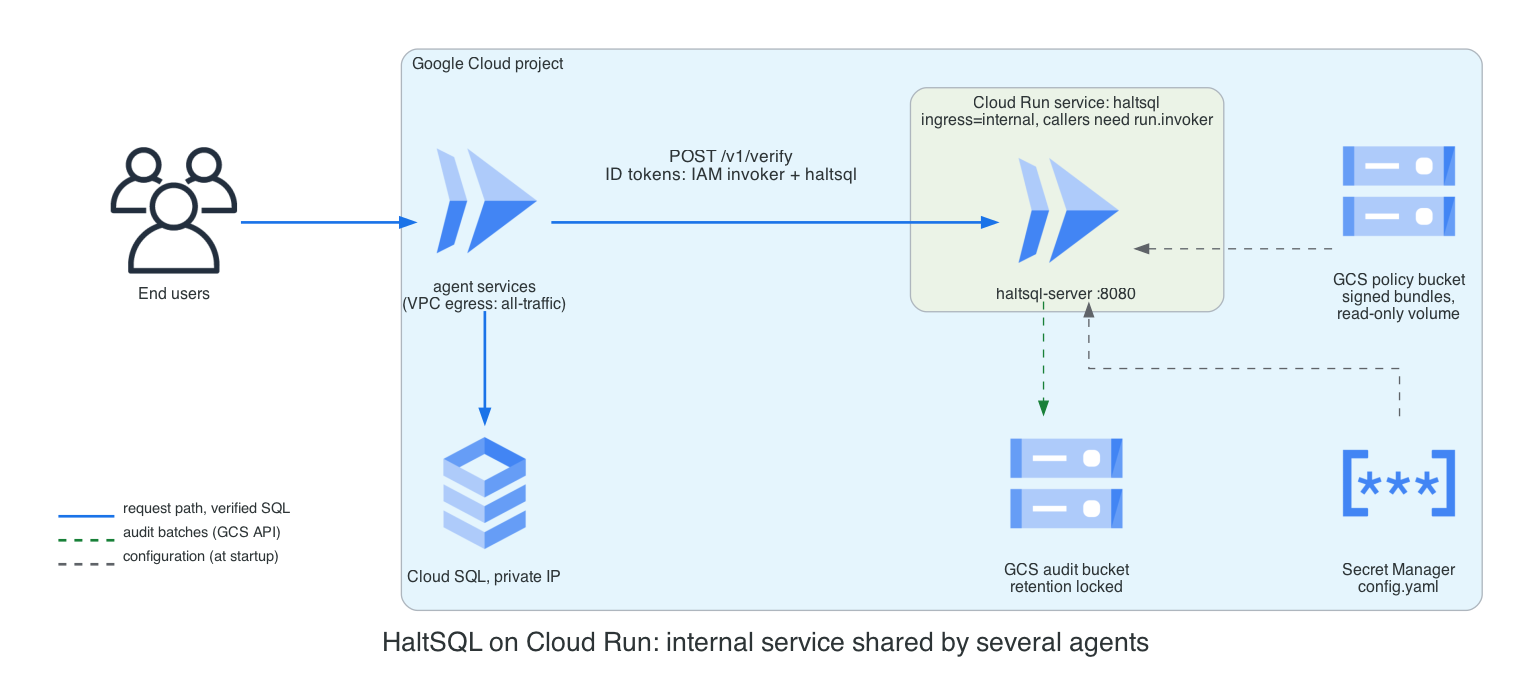
cloudrun/service-internal.yaml
runs haltsql-server as its own service with ingress: internal and no
allUsers invoker. Requests pass two checks:
X-Serverless-Authorizationis checked by Cloud Run (IAM invoker), which leavesAuthorizationfor haltsql. Cloud Run removes the signature from theX-Serverless-Authorizationtoken before forwarding it, so haltsql never relies on that header.- haltsql's providers are in
haltsql-internal-config.yaml, one per calling service account, as in pattern 1b. - Policies come from a signed bundle on a read-only Cloud Storage volume
(
gcsfuse.run.googleapis.com, which needs the second-generation execution environment). The trusted public key is in the config, which lives in Secret Manager, so write access to the policy bucket is not enough to change policies. See policy-bundles.md. - Internal ingress and callers. A request counts as internal when it
comes from a VPC network of the project (for example GKE pods, with Private
Google Access on the subnet) or from a Cloud Run service whose egress goes
through the VPC with
--vpc-egress=all-traffic. A Cloud Run caller withprivate-ranges-onlyegress reaches therun.appURL over the internet and is refused. Withall-traffic, the caller needs Cloud NAT for any other internet destination (the LLM API, for example).
deploy/cloud/gcp/iam/setup.sh cloud-run-internal
gcloud storage cp dist/prod.haltsqlbundle dist/prod.haltsqlbundle.sig gs://$PROJECT_ID-haltsql-policies/
gcloud run services replace deploy/cloud/gcp/cloudrun/service-internal.yaml --region $REGION
gcloud run services add-iam-policy-binding haltsql --region $REGION \
  --member serviceAccount:analytics-agent@$PROJECT_ID.iam.gserviceaccount.com \
  --role roles/run.invoker
Cloud Run terminates TLS in front of the container, so server.tls is not
used here. The hop from the Google front end to the container is inside
Google's network.
Pattern 3: haltsql-proxy in front of Cloud SQL
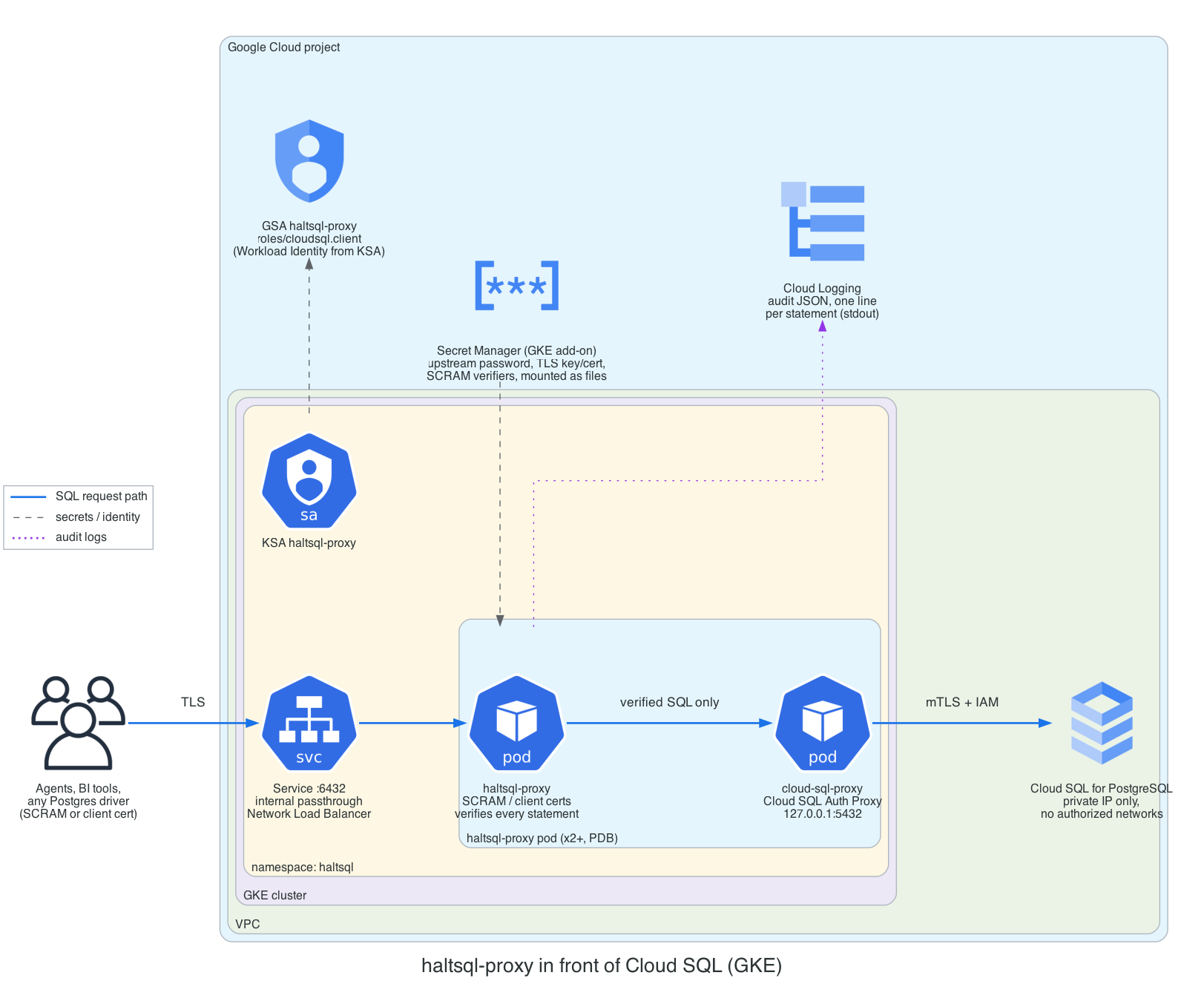
haltsql-proxy speaks the Postgres wire protocol, so it needs a TCP load
balancer: run it on GKE (or Compute Engine). Cloud Run accepts only HTTP(S),
gRPC and WebSockets.
- Clients connect to the
haltsql-proxyService (internal passthrough Network Load Balancer, port 6432, TLS required) with a proxy user and password (SCRAM-SHA-256) or a client certificate. Each user is bound to one policy and one tenant context in the proxy config. - Every
QueryandParseis verified; tenancy parameters in everyBindare overwritten with the session's context. Only verified SQL is forwarded. - The upstream hop goes to the Cloud SQL Auth Proxy on
127.0.0.1:5432(in the same pod), which connects to the instance's private IP over mTLS, authorized by IAM (roles/cloudsql.client). Give the instance no public IP and no authorized networks, so only this path exists. - Secrets (upstream password, TLS key and certificate, SCRAM verifiers) come
from Secret Manager through the GKE Secret Manager add-on and are read with
${file:...}or as file paths.haltsql-proxydoes not resolve${gcp-sm:...}itself. Note thattls.keyandtls.certmust be file paths, not${file:...}placeholders.
gcloud container clusters update CLUSTER --location $REGION --enable-secret-manager
printf '%s' "$UPSTREAM_PASSWORD" | gcloud secrets create haltsql-proxy-upstream-password --data-file=-
haltsql-proxy scram-verifier | gcloud secrets create haltsql-proxy-scram-analytics-agent --data-file=-
gcloud secrets create haltsql-proxy-tls-crt --data-file=tls.crt
gcloud secrets create haltsql-proxy-tls-key --data-file=tls.key
deploy/cloud/gcp/iam/setup.sh proxy
kubectl apply -f deploy/cloud/gcp/proxy/haltsql-proxy.yaml
psql "host=PROXY_ILB_IP port=6432 dbname=app user=analytics-agent sslmode=verify-full sslrootcert=ca.crt"
The proxy writes one JSON audit line per statement to stdout (Cloud Logging). It has no metrics or HTTP health endpoint, so the manifest probes the TCP port. See proxy.md for the full reference.
IAM reference
Grant roles on the narrowest resource that supports them. Nothing in HaltSQL needs a project-wide Storage or Secret Manager role.
| Identity | Role | On | Why |
|---|---|---|---|
haltsql (any pattern with a gcs sink) | roles/storage.objectCreator | the audit bucket | Create audit objects. No read, list, overwrite or delete. HaltSQL uploads with ifGenerationMatch=0 and treats 412 as "already stored", so it never needs storage.objects.get. |
haltsql (with ${gcp-sm:...}) | roles/secretmanager.secretAccessor | each referenced secret | Read secret payloads at load and reload. |
| haltsql, Cloud Run 2B | roles/storage.objectViewer | the policy bucket | Read signed bundles through the Cloud Storage volume. |
| haltsql, Cloud Run | roles/secretmanager.secretAccessor | the config / policy / token-hash secrets | Cloud Run mounts them with the revision's service account. |
| OTel Collector | roles/cloudtrace.agent | project | Write spans. |
| OTel Collector (Cloud Run 2A) | roles/monitoring.metricWriter | project | Write scraped metrics to Managed Prometheus. |
| Cloud SQL Auth Proxy | roles/cloudsql.client | project (add an IAM condition on the instance name to narrow it) | Connect to the instance. |
| Agent logging in with IAM DB auth | roles/cloudsql.instanceUser | project (conditionable) | IAM database login. |
| KSA (GKE) | roles/iam.workloadIdentityUser | the GSA | Lets PROJECT.svc.id.goog[NAMESPACE/KSA] impersonate the GSA. |
| Each caller of the internal service | roles/run.invoker | the haltsql Cloud Run service | Pass Cloud Run's IAM check. |
Example of a single-secret grant:
gcloud secrets add-iam-policy-binding haltsql-analytics-agent-token-sha256 \
  --member serviceAccount:haltsql-agent@$PROJECT_ID.iam.gserviceaccount.com \
  --role roles/secretmanager.secretAccessor
gcloud storage buckets add-iam-policy-binding gs://$PROJECT_ID-haltsql-audit \
  --member serviceAccount:haltsql-agent@$PROJECT_ID.iam.gserviceaccount.com \
  --role roles/storage.objectCreator
Nobody who operates haltsql day to day should hold storage.objects.delete
or storage.buckets.update on the audit bucket. Keep readers (auditors) in a
separate group with roles/storage.objectViewer.
Networking
- Verification traffic. In the sidecar patterns it stays on loopback
inside the pod or Cloud Run instance. In the shared patterns it stays inside
the VPC: a ClusterIP Service, an internal passthrough load balancer
(
networking.gke.io/load-balancer-type: "Internal"), or Cloud Run withingress: internal. - Outbound calls from haltsql-server. Only what you configure: Secret
Manager and Cloud Storage (
*.googleapis.com:443), the metadata server, the OIDC issuer's discovery and JWKS URLs, and the OTLP collector. With private nodes, enable Private Google Access on the subnet; with VPC Service Controls, put Secret Manager, Cloud Storage and Cloud Trace in the perimeter and route*.googleapis.comtorestricted.googleapis.com. - NetworkPolicy on GKE. Workload Identity needs egress to the GKE
metadata server:
169.254.169.252/32port 988, or169.254.169.254/32port 80 on GKE Dataplane V2 clusters. The manifests allow both. Without it, token requests time out and the server refuses to start (${gcp-sm:...}) or the audit sink turns unhealthy. - Database. Cloud SQL with private IP only. Only the Cloud SQL Auth Proxy (agent pod, or proxy pod) reaches it on port 3307.
TLS
| Hop | How it is protected |
|---|---|
| Agent to sidecar | Loopback; no TLS needed. A token is still required. |
| Agent to shared haltsql on GKE | Built-in TLS (tls.enabled, TLS 1.3), or a service mesh (Cloud Service Mesh) with mTLS. Certificates from cert-manager with a Google CAS issuer rotate without restarts (reload.watch). |
| Agent to internal Cloud Run service | HTTPS terminated by Cloud Run. |
| Client to haltsql-proxy | tls.required: true; client certificates with auth.method: cert if you want them. |
| haltsql-proxy / agent to Cloud SQL | Cloud SQL Auth Proxy (mTLS, ephemeral certificates). The loopback hop to it does not leave the pod. |
| haltsql to Google APIs | HTTPS with the system trust store. |
Audit retention and verification
The gcs sink writes hash-chained batches (one object per
batch.max_records records or batch.max_seconds seconds) with
ifGenerationMatch=0, so an object is never overwritten, and checks the
md5Hash Cloud Storage returns. See audit-sinks.md for the
object layout and the chain.
Make the bucket write-once:
-
Create it with a retention policy (
setup.sh audit-bucketuses 400 days; setAUDIT_RETENTIONfor your requirement). Objects cannot be deleted or replaced until they are that old. -
Once the period is right, lock it. Locking is irreversible: the policy can never be shortened or removed.
gcloud storage buckets update gs://$PROJECT_ID-haltsql-audit --lock-retention-period -
Optionally add a lifecycle rule that deletes objects after the retention period, and a default Cloud KMS key on the bucket if you need CMEK (the sink needs nothing extra for either).
HaltSQL sets no per-object retention or holds itself; WORM comes from the
bucket policy. Keep spool_dir on storage that survives restarts where you
can (on GKE an emptyDir survives container restarts but not pod deletion),
so the chain continues across restarts; otherwise each run starts at genesis.
To verify a day of one pod's objects:
gcloud storage cp -r "gs://$PROJECT_ID-haltsql-audit/haltsql/audit/analytics-agent/2026/11/08/" ./audit/
find ./audit -name 'analytics-agent-7f9c-*.jsonl' | sort | xargs cat > day.jsonl
python3 verify_chain.py day.jsonl    # script in audit-sinks.md
Without a persistent spool, group the objects by the <run> part of the name
and verify each group from genesis.
Observability
| Signal | Path on Google Cloud |
|---|---|
Prometheus metrics (/metrics) | Managed Service for Prometheus: PodMonitoring on GKE; the collector's prometheus receiver on Cloud Run. Includes haltsql_audit_sink_*. |
Traces (haltsql.verify spans) | OTLP/HTTP (JSON) to an OpenTelemetry Collector, googlecloud exporter to Cloud Trace. haltsql cannot authenticate to Google's telemetry endpoints itself, so the collector is required. An incoming W3C traceparent is honoured, so spans join the agent's trace. |
| Logs | JSON lines on stderr, collected by Cloud Logging. haltsql writes level and msg (not severity and message), so filter on jsonPayload.level. |
| Audit | GCS (compliance copy); optionally also stdout for search in Cloud Logging. |
Set telemetry.otlp.metrics: false when Prometheus scraping is on, so the
same counters are not ingested twice.
Alerts worth creating (PromQL in Cloud Monitoring):
| Query | Meaning |
|---|---|
min(haltsql_audit_sink_healthy) == 0 | An audit sink refuses writes; with fail_closed, verify returns 503. |
rate(haltsql_audit_sink_upload_failures_total[5m]) > 0 | Uploads to GCS are failing (IAM, network, quota). |
max(haltsql_audit_sink_pending_objects) > 0 for 5 minutes | Batches are stuck. |
increase(haltsql_policy_reload_total{result="error"}[10m]) > 0 | A policy or secret change was rejected; the old set is still active. |
histogram_quantile(0.99, sum by (le) (rate(haltsql_verify_duration_seconds_bucket[5m]))) > 0.05 | Verification is slow. |
rate(haltsql_auth_total{result="unavailable"}[5m]) > 0 | Google's JWKS cannot be fetched (shared patterns). |
The SQL text is never exported in spans. Join a span to its audit record on
db.statement.sha256 = sql_sha256.
Scaling and high availability
haltsql-serveris stateless and CPU-bound; a verification usually takes well under a millisecond. As a sidecar it scales with the agent. 50m CPU and 32-64 MiB is a reasonable request for one agent.- GKE shared service: at least 3 replicas spread across zones
(
topologySpreadConstraints), a PodDisruptionBudget, and an HPA on CPU. Use a regional cluster. - Cloud Run:
minScaleof 1 or more avoids cold starts on the verify path (startup includes resolving secrets and, for OIDC, fetching JWKS). haltsql handles high concurrency;containerConcurrencyof 80-250 is fine. Cloud Run is regional; deploy one service per region if agents are multi-region, each with its own audit prefix. - Dependencies at runtime: Secret Manager is needed only at startup and
reload; a failed reload keeps the last good config. GCS is on the write
path: with
on_error: fail_closedan outage makes verify return 503 after the retries are exhausted; withbuffer, records are held in memory (up to 100 000) and uploaded later. Choose per your compliance requirements. - haltsql-proxy: two or more replicas behind the internal load balancer.
Size the Cloud SQL connection limit for
replicas x max_connections.
Cost notes
- Sidecars add a small, fixed CPU and memory request per agent pod or Cloud Run instance. A shared service is cheaper with many small agents.
- Cloud Run instance-based billing (
cpu-throttling: false) charges for the whole instance lifetime. It is needed for timely audit flushes; keepminScalelow andcontainerConcurrencyhigh. - Cloud Storage: one object per batch per instance (at least one per
max_secondswhile traffic flows). Raisingbatch.max_secondsandmax_recordslowers Class A operation counts. Retention means you pay for storage for at least the retention period; a lifecycle rule to a colder storage class reduces it (objects keep their retention). - Cloud Logging: a
stdoutaudit sink duplicates every record into Logging ingestion. Drop it when GCS is enough, or exclude it with a sink filter. - Cloud Trace and Managed Prometheus bill per span and per sample.
haltsql exports a span when the incoming
traceparenthas the sampled flag set, and always when there is notraceparent, so propagate your agent's sampling decision. Scrape every 30-60 seconds.
Production checklist
- The image is pinned by digest, verified with cosign, and mirrored to Artifact Registry.
- No service-account keys anywhere; GKE uses Workload Identity, Cloud Run the revision's service account.
- Each GSA holds only the roles in the IAM reference, bound to single secrets and buckets.
- Audit bucket: uniform bucket-level access, public access prevention, retention policy locked, no delete permission for operators.
-
on_errorchosen deliberately (fail_closedfor compliance), andhaltsql_audit_sink_healthyalerts configured. -
audit.log_raw_sqlstaysfalseunless you have a reason and a data classification for it. - Every token, OIDC provider and mTLS identity is pinned to one policy;
allow_unauthenticatedisfalse. - Shared services: TLS on (or Cloud Run HTTPS), ingress limited to the
agents' namespaces or
ingress: internal,run.invokeronly for the callers. - NetworkPolicies allow the metadata server, Google APIs and the collector, and nothing else.
- Cloud SQL: private IP only, no authorized networks, a least-privilege
role for the agent (or
haltsql_servicefor the proxy), row-level security on. - Policies ship as signed bundles (or through reviewed ConfigMap changes), and config changes roll out as new revisions on Cloud Run.
-
haltsql config show(orhaltsql-proxy validate) runs in CI against the exact config you deploy. - The chain verification job runs regularly against the audit bucket.
Limitations on Google Cloud
- Google credentials come only from the metadata server or a
service-account key file. Workload Identity Federation credential files
(
external_account) are not supported, so running outside Google Cloud needs a key. - The
gcssink does not readGOOGLE_APPLICATION_CREDENTIALS; setcredentials.source: service_account_fileexplicitly. - The
gcssink sets no per-object retention or holds; rely on a bucket retention policy. - OTLP export cannot authenticate to Google endpoints; use a collector.
- Secret Manager values are read at load and reload only. A rotated secret
takes effect after
SIGHUP, a file change withreload.watch, or a new Cloud Run revision. - Log lines use
level/msg, not Cloud Logging'sseverity/message. haltsql-proxyhas no${gcp-sm:...}, no GCS audit sink, no metrics and no HTTP health endpoint.
Console
To run haltsql-console (the control plane) next to these deployments: on
GKE with the haltsql-console chart, Workload Identity for GCS audit reads
and Secret Manager, Identity-Aware Proxy in front and a Persistent Disk for
its state; or on Cloud Run as a single always-on instance with a Filestore
volume. See console/deploy.md and
deploy/cloud/gcp/console/. Each verifier
needs server.admin enabled with the console's token in
server.admin.callers.
Regenerating the diagrams
The architecture images on this page are drawn as code with
mingrammer/diagrams, one script per
diagram: deploy/diagrams/gcp_*.py. Every other
diagram on this page is Mermaid, inline in the Markdown. You need Graphviz
(dot). From the repository root:
make diagrams                                     # every cloud, in a managed virtualenv
deploy/diagrams/.venv/bin/python deploy/diagrams/gcp_<name>.py   # one diagram
Each script writes the matching docs/assets/cloud/gcp-<name>.png. Commit
the PNG together with the script change. See
deploy/diagrams/README.md for the shared style.