Deploying HaltSQL on Microsoft Azure
This guide covers three ways to run HaltSQL on Azure:
- AKS sidecar (recommended):
haltsql-serverruns in the agent's pod. - Azure Container Apps: as a sidecar container in the agent's app, or as a shared internal service.
haltsql-proxyin front of Azure Database for PostgreSQL Flexible Server, for agents you cannot change.
Ready-to-edit manifests are in
deploy/cloud/azure/. The general deployment
guidance in deployment.md and
how-it-works/deployment-modes.md also
applies here.
Read this first: HaltSQL has no Azure-native integrations yet. HaltSQL reads secrets from environment variables, files, HashiCorp Vault, AWS Secrets Manager and Google Secret Manager. Its object-store audit sinks are S3 and GCS. It cannot call Azure Key Vault, write to Azure Blob Storage, or use a managed identity. This guide gets the same results with standard Azure tooling: the Key Vault CSI driver or Container Apps secret references (exposed to HaltSQL as files), a log shipper for Blob, and an OpenTelemetry Collector for Azure Monitor. The full list of gaps is in Current limitations on Azure.
What does work without changes on Azure:
- Microsoft Entra ID as the OIDC issuer. HaltSQL's JWT authentication is generic OIDC, so it accepts Entra ID access tokens, including tokens that agents get through AKS Workload Identity or a Container Apps managed identity.
- Built-in TLS and mTLS, signed policy bundles, Prometheus metrics and OTLP/HTTP export.
haltsql-server never connects to the database, and it needs no Azure
permissions of its own. In both server patterns, the only Azure identities
belong to the agent, the CSI driver or Container Apps platform (to read Key
Vault), and the log shipper (to write Blob). Keep the haltsql container out
of every identity binding.
Terraform. To provision these patterns as code, use the modules in
deploy/terraform(terraform.md):haltsql-azurerunshaltsql-serveron Container Apps, andhaltsql-kubernetesinstalls the Helm chart on any cluster. This guide explains the architecture and the settings those modules expose; the manifests indeploy/cloud/azure/are the equivalent by hand.
Choosing a pattern
| Pattern | Latency | Isolation | Auth | Ops effort | Best for |
|---|---|---|---|---|---|
| AKS sidecar | loopback, sub-millisecond | per pod; policy ships with the agent | static token from Key Vault (or Entra ID) | low | most production agents |
| AKS shared service | one in-cluster hop | central; one policy rollout for all agents | Entra ID JWT, TLS | medium | platform teams serving many agents |
| Container Apps sidecar | loopback | per replica | static token from Key Vault | low | serverless agents |
| Container Apps shared service | ingress hop (Envoy) | central | Entra ID JWT, TLS at ingress | low | many small agent apps |
haltsql-proxy | one Postgres hop | enforced: the agent cannot skip it | SCRAM or client certificates | medium | agents and BI tools you cannot change |
Prerequisites
-
Azure CLI 2.60 or later, with the
containerappextension for Container Apps (az extension add -n containerapp --upgrade), pluskubectland Helm 3 for AKS. -
Permission to create resource groups, managed identities, role assignments (Owner or User Access Administrator on the resource group) and an Entra ID app registration (Application Developer or higher), if you use Entra ID authentication.
-
A VNet with separate subnets: AKS nodes (or the Container Apps environment, delegated to
Microsoft.App/environments), private endpoints, and Flexible Server (delegated toMicrosoft.DBforPostgreSQL/flexibleServers). -
Policies that pass
haltsql validateandhaltsql testin CI (see policy-ci.md). -
The image
ghcr.io/haltsql/haltsql:<version>. Import it into your Azure Container Registry so nodes do not pull from the internet, and pin it by digest:az acr import -n "$ACR" --source ghcr.io/haltsql/haltsql:0.0.1 --image haltsql:0.0.1To verify the signature first, see deployment.md.
The commands below use these shell variables:
RG=rg-haltsql
LOC=westeurope
AKS=aks-agents
KV=kv-haltsql-prod            # globally unique
ST=sthaltsqlaudit             # globally unique, 3-24 lowercase letters/digits
ACR=acragents                 # globally unique
TENANT_ID=$(az account show --query tenantId -o tsv)
Pattern 1: AKS sidecar (recommended)
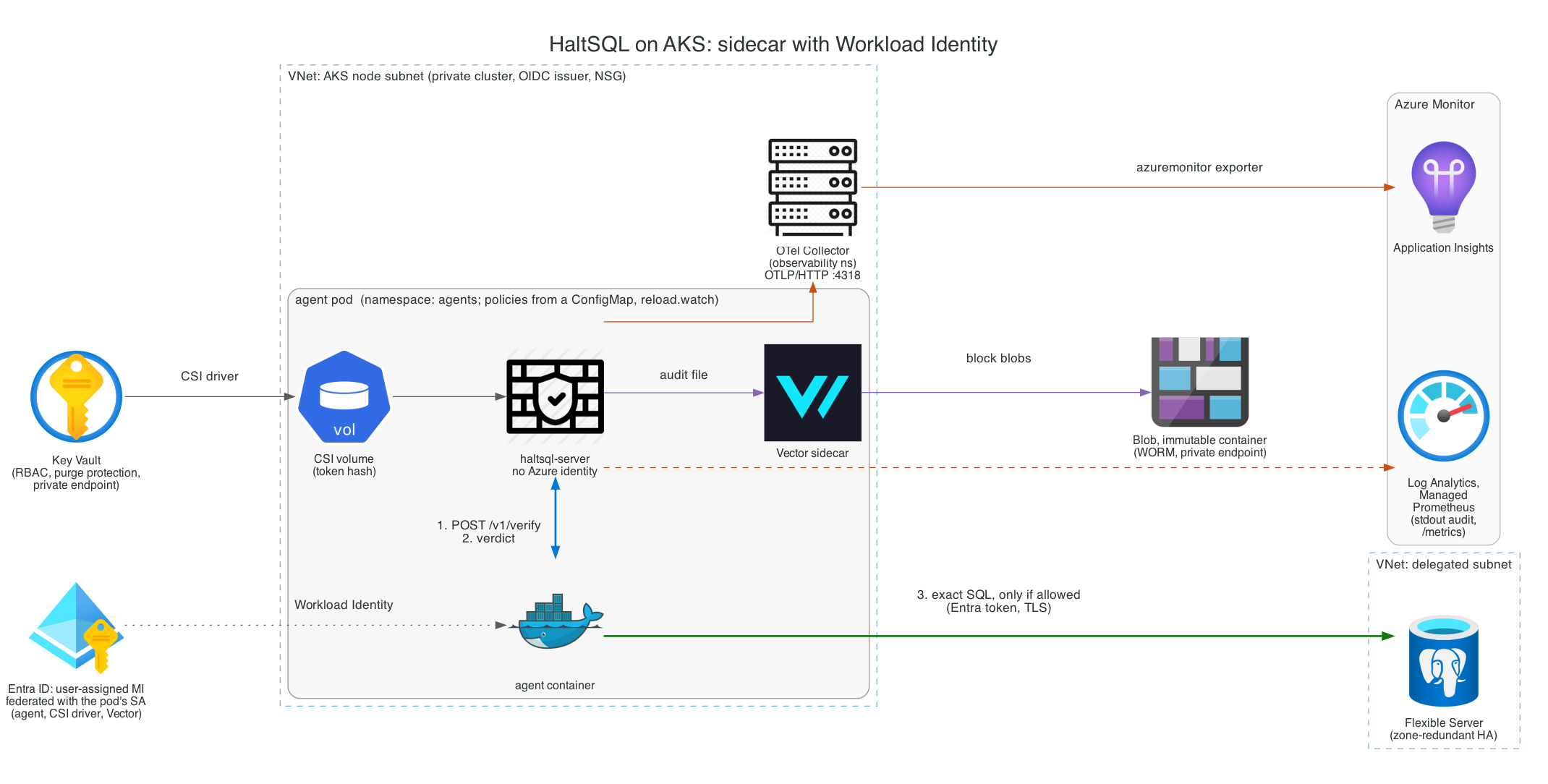
The agent calls http://127.0.0.1:8080/v1/verify inside its own pod. The
call never leaves the pod. The agent runs the exact SQL it verified against
Flexible Server, using its own Entra ID identity. HaltSQL never sees database
credentials.
| Container | Azure identity | Reads | Writes |
|---|---|---|---|
agent | user-assigned managed identity (Workload Identity) | raw HaltSQL token (CSI volume) | SQL to Flexible Server |
haltsql | none (excluded with azure.workload.identity/skip-containers) | token hash (CSI volume), ConfigMap | audit file, stdout, OTLP |
vector | same managed identity, Blob write only | audit file (read-only mount) | Blob (immutable container) |
The CSI driver reads Key Vault with the pod's identity before any container starts.
1. Cluster with Workload Identity, the Key Vault CSI driver and monitoring
az group create -n "$RG" -l "$LOC"

az aks create -g "$RG" -n "$AKS" \
  --zones 1 2 3 \
  --enable-oidc-issuer --enable-workload-identity \
  --enable-addons azure-keyvault-secrets-provider,monitoring \
  --enable-secret-rotation \
  --enable-azure-monitor-metrics \
  --network-plugin azure --network-plugin-mode overlay \
  --network-dataplane cilium --network-policy cilium \
  --enable-private-cluster \
  --vnet-subnet-id "$AKS_SUBNET_ID" \
  --attach-acr "$ACR" \
  --generate-ssh-keys

ISSUER=$(az aks show -g "$RG" -n "$AKS" --query oidcIssuerProfile.issuerUrl -o tsv)
monitoring turns on Container Insights (logs to Log Analytics), and
--enable-azure-monitor-metrics turns on Managed Prometheus. A network policy
engine is required for the NetworkPolicy in the manifest.
2. Managed identity, federated with the agent's ServiceAccount
az identity create -g "$RG" -n id-analytics-agent
MI_CLIENT_ID=$(az identity show -g "$RG" -n id-analytics-agent --query clientId -o tsv)
MI_PRINCIPAL_ID=$(az identity show -g "$RG" -n id-analytics-agent --query principalId -o tsv)

az identity federated-credential create -g "$RG" \
  --identity-name id-analytics-agent --name fc-analytics-agent \
  --issuer "$ISSUER" \
  --subject system:serviceaccount:agents:analytics-agent \
  --audience api://AzureADTokenExchange
3. Key Vault and the token secrets
Generate the agent's bearer token and its hash. Store both in Key Vault. The
agent container mounts only the token; the haltsql container mounts only
the hash.
az keyvault create -g "$RG" -n "$KV" -l "$LOC" \
  --enable-rbac-authorization true --enable-purge-protection true \
  --public-network-access Disabled
KV_ID=$(az keyvault show -n "$KV" --query id -o tsv)

# Run from a host with private access to the vault (or open access briefly).
TOKEN="$(openssl rand -hex 32)"
az keyvault secret set --vault-name "$KV" -n haltsql-agent-token --value "$TOKEN" -o none
az keyvault secret set --vault-name "$KV" -n haltsql-token-sha256 \
  --value "$(printf '%s' "$TOKEN" | sha256sum | cut -d' ' -f1)" -o none
unset TOKEN

# Least privilege: only these two secrets, read-only.
for s in haltsql-agent-token haltsql-token-sha256; do
  az role assignment create --assignee-object-id "$MI_PRINCIPAL_ID" \
    --assignee-principal-type ServicePrincipal \
    --role "Key Vault Secrets User" --scope "$KV_ID/secrets/$s"
done
Create a private endpoint for the vault (az network private-endpoint create ... --group-id vault) in the private endpoint subnet, with the
privatelink.vaultcore.azure.net private DNS zone linked to the VNet.
4. Immutable Blob container for audit records
az storage account create -g "$RG" -n "$ST" -l "$LOC" \
  --sku Standard_ZRS --kind StorageV2 --min-tls-version TLS1_2 \
  --allow-blob-public-access false --allow-shared-key-access false \
  --public-network-access Disabled
ST_ID=$(az storage account show -g "$RG" -n "$ST" --query id -o tsv)

az storage container-rm create -g "$RG" --storage-account "$ST" -n haltsql-audit

# Time-based retention (WORM): blobs cannot be modified or deleted for 365 days.
az storage container immutability-policy create -g "$RG" --account-name "$ST" \
  -c haltsql-audit --period 365
Test the pipeline end to end, then lock the policy. A locked policy cannot be shortened or removed (this is what auditors ask for, for example for SEC 17a-4(f)):
ETAG=$(az storage container immutability-policy show -g "$RG" --account-name "$ST" \
  -c haltsql-audit --query etag -o tsv)
az storage container immutability-policy lock -g "$RG" --account-name "$ST" \
  -c haltsql-audit --if-match "$ETAG"
Give the shipper write access to that container only:
az role assignment create --assignee-object-id "$MI_PRINCIPAL_ID" \
  --assignee-principal-type ServicePrincipal \
  --role "Storage Blob Data Contributor" \
  --scope "$ST_ID/blobServices/default/containers/haltsql-audit"
Storage Blob Data Contributor includes delete, which the immutability
policy blocks anyway. For a strictly create-only identity, define a custom
role with only the data actions
Microsoft.Storage/storageAccounts/blobServices/containers/blobs/write and
.../blobs/add/action, and set healthcheck.enabled: false on the Vector
sink, because its health check needs read access.
Add a private endpoint with --group-id blob and the
privatelink.blob.core.windows.net zone.
5. Deploy
Edit the REPLACE_* values in
aks/secretproviderclass.yaml,
aks/agent-sidecar.yaml and
aks/otel-collector.yaml,
then:
az aks get-credentials -g "$RG" -n "$AKS"
kubectl create namespace agents
kubectl create namespace observability
kubectl -n observability create secret generic appinsights \
  --from-literal=connection-string="$APPINSIGHTS_CONNECTION_STRING"

kubectl apply -f deploy/cloud/azure/aks/otel-collector.yaml
kubectl apply -f deploy/cloud/azure/aks/secretproviderclass.yaml
kubectl apply -f deploy/cloud/azure/aks/agent-sidecar.yaml
kubectl -n agents rollout status deploy/analytics-agent
The haltsql configuration in agent-sidecar.yaml, abridged:
server:
  auth:
    tokens:
      - name: analytics-agent
        token_sha256: ${file:/mnt/secrets/haltsql/haltsql-token-sha256}   # CSI-mounted from Key Vault
        policy: analytics-agent
reload: { watch: true }
audit:
  sinks:
    - type: file                         # shipped to immutable Blob by Vector
      path: /var/log/haltsql/audit.jsonl
      on_error: fail_closed
    - type: stdout                       # Container Insights, for search and alerts
telemetry:
  otlp:
    endpoint: http://otel-collector.observability.svc.cluster.local:4318
Every key is a standard HaltSQL config key (see config-reference.md). There is nothing Azure-specific in the config itself.
AKS shared service (Helm)
For a central service, install the chart with
aks/values-aks.yaml. It sets
up Entra ID authentication, built-in TLS 1.3, three replicas spread across
zones, a PodDisruptionBudget and an HPA.
kubectl create namespace haltsql
kubectl apply -f deploy/cloud/azure/aks/networkpolicy-shared.yaml
helm upgrade --install haltsql deploy/helm/haltsql -n haltsql \
  -f deploy/cloud/azure/aks/values-aks.yaml
The overlay has to work around three chart limitations:
- The chart's NetworkPolicy denies all egress. OIDC must fetch the JWKS
from
login.microsoftonline.com, so the overlay turns off the chart's NetworkPolicy, andnetworkpolicy-shared.yamlreplaces it (DNS, HTTPS, OTLP). - The chart's ServiceMonitor uses the
monitoring.coreos.comgroup, but Managed Prometheus only readsazmonitoring.coreos.com. The overlay turns it off, andnetworkpolicy-shared.yamladds a PodMonitor instead. - The chart has no
extraVolumes. You cannot mount a CSI volume into it. The TLS Secrethaltsql-tlsmust come from cert-manager, or from Key Vault through External Secrets Operator (aks/externalsecret-tls.yaml). With Entra ID authentication, the service needs no other secrets.
Pattern 2: Azure Container Apps
Container Apps runs all containers of an app in one replica, so they share
localhost. There are no ConfigMaps, so build a small image that adds your
config and policies on top of the HaltSQL image
(containerapps/Dockerfile).
The image is immutable and versioned, and it is the unit you roll back.
Secrets stay out of the image: they are Key Vault references that the
platform reads with the app's managed identity and mounts as files.
Environment
az containerapp env create -g "$RG" -n cae-agents -l "$LOC" \
  --infrastructure-subnet-resource-id "$CAE_SUBNET_ID" \
  --internal-only true \
  --enable-workload-profiles \
  --zone-redundant \
  --logs-destination log-analytics \
  --logs-workspace-id "$LAW_CUSTOMER_ID" --logs-workspace-key "$LAW_KEY"

az identity create -g "$RG" -n id-analytics-agent
# Grant it "Key Vault Secrets User" on the secrets (as in Pattern 1)
# and "AcrPull" on the registry.

az acr build -r "$ACR" -t haltsql-analytics:1.0.0 \
  --build-arg CONFIG=sidecar.yaml deploy/cloud/azure/containerapps
Option A: sidecar (containerapps/app.yaml)
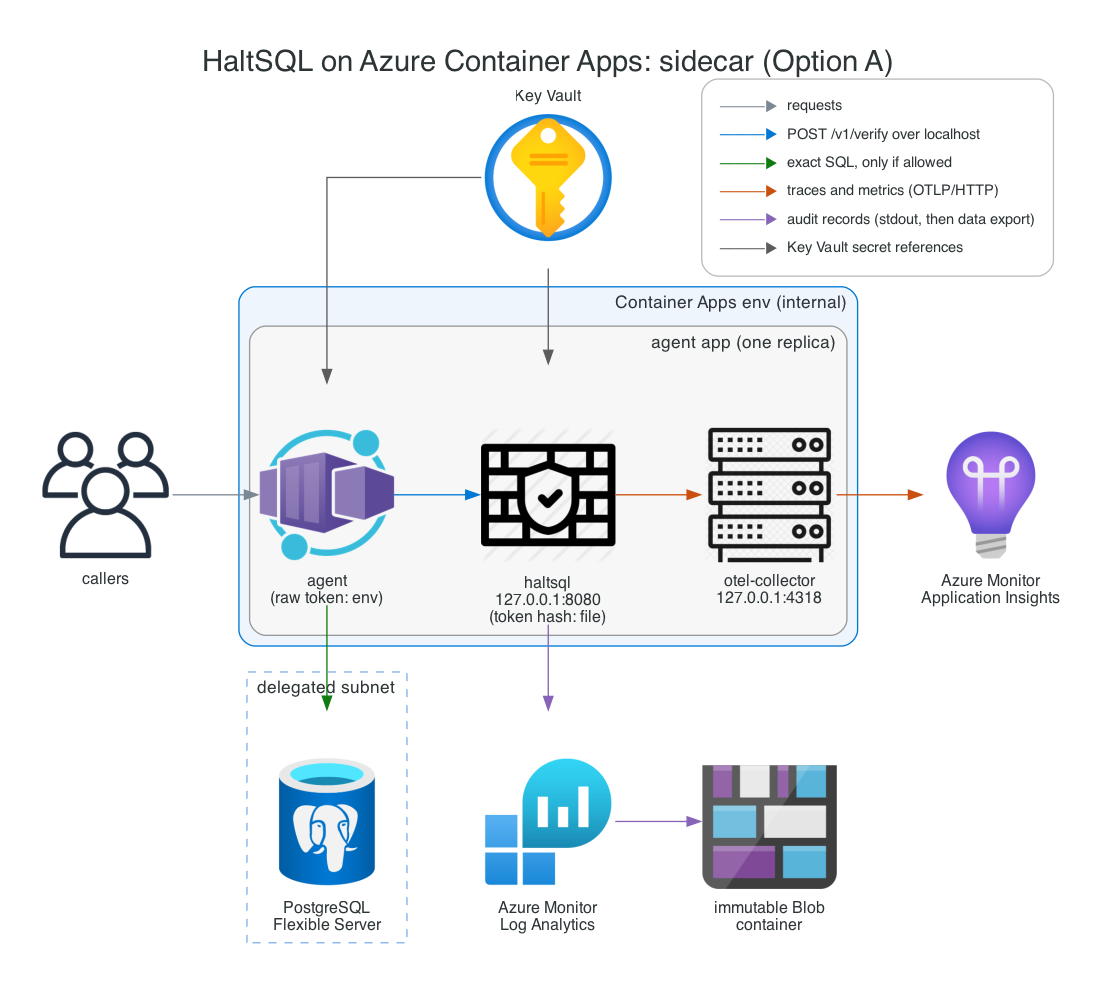
az containerapp create -g "$RG" -n analytics-agent \
  --yaml deploy/cloud/azure/containerapps/app.yaml
haltsqlserves the verify API on127.0.0.1:8080only. Platform probes use--health-listen 0.0.0.0:8081, which serves only/healthzand/readyz.- Ingress targets the agent's port, never HaltSQL.
- The token hash is mounted at
/mnt/secrets/haltsql-token-sha256from a Key Vault reference (storageType: Secretvolume). The raw token reaches only the agent, as an environment variable. otel-collectoris a third container. It receives OTLP/HTTP on127.0.0.1:4318and exports to Application Insights. You need it because the Container Apps managed OpenTelemetry agent accepts only gRPC, and HaltSQL exports OTLP over HTTP with JSON encoding.- Size the containers together: 0.5 + 0.25 + 0.25 vCPU and 1 + 0.5 + 0.5 GiB adds up to an allowed Consumption combination (1 vCPU, 2 GiB).
Option B: shared internal service (containerapps/shared-service.yaml)
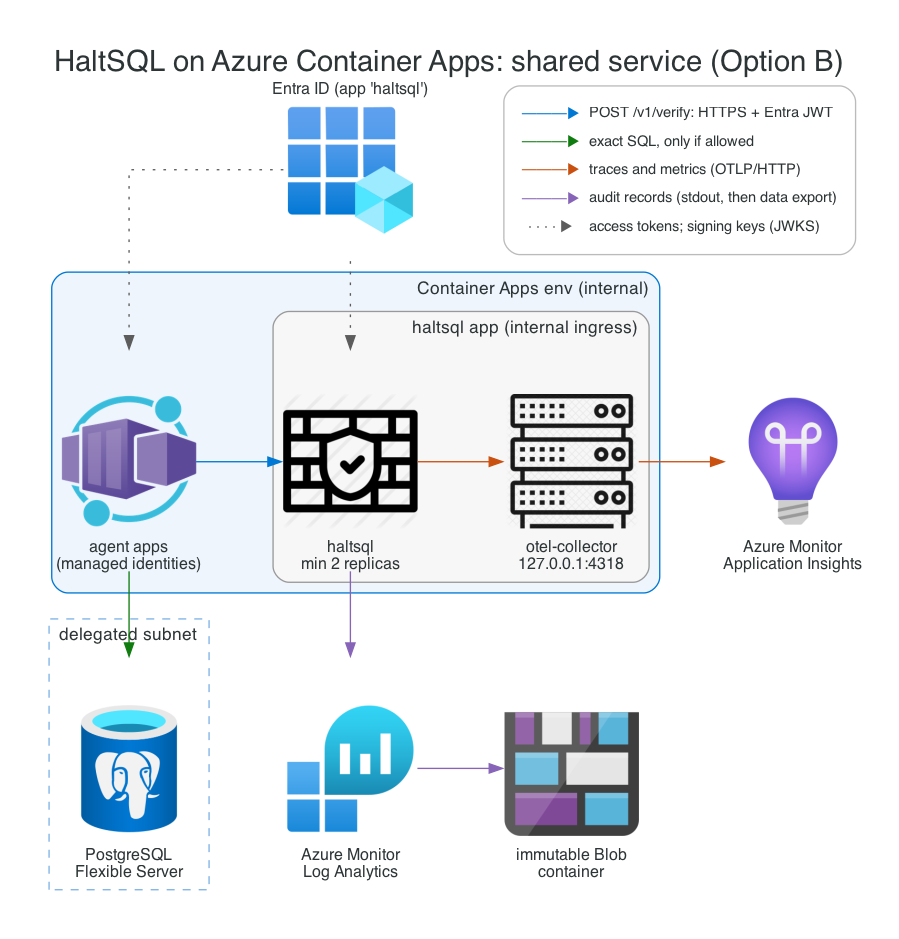
az acr build -r "$ACR" -t haltsql-shared:1.0.0 \
  --build-arg CONFIG=shared.yaml deploy/cloud/azure/containerapps
az containerapp create -g "$RG" -n haltsql \
  --yaml deploy/cloud/azure/containerapps/shared-service.yaml
Agents call https://haltsql.internal.<environment default domain>/v1/verify
with an Entra ID access token (see Identity).
Ingress terminates TLS. To encrypt traffic between replicas inside the
environment too, turn on peer-to-peer encryption:
az containerapp env update -g "$RG" -n cae-agents --enable-peer-to-peer-encryption
minReplicas: 2 keeps the firewall from scaling to zero. Do not let it scale
to zero: the agent would block on a cold start, or fail open if it was written
carelessly. activeRevisionsMode: Multiple lets you canary a new policy image
with traffic weights.
Pattern 3: haltsql-proxy in front of Flexible Server
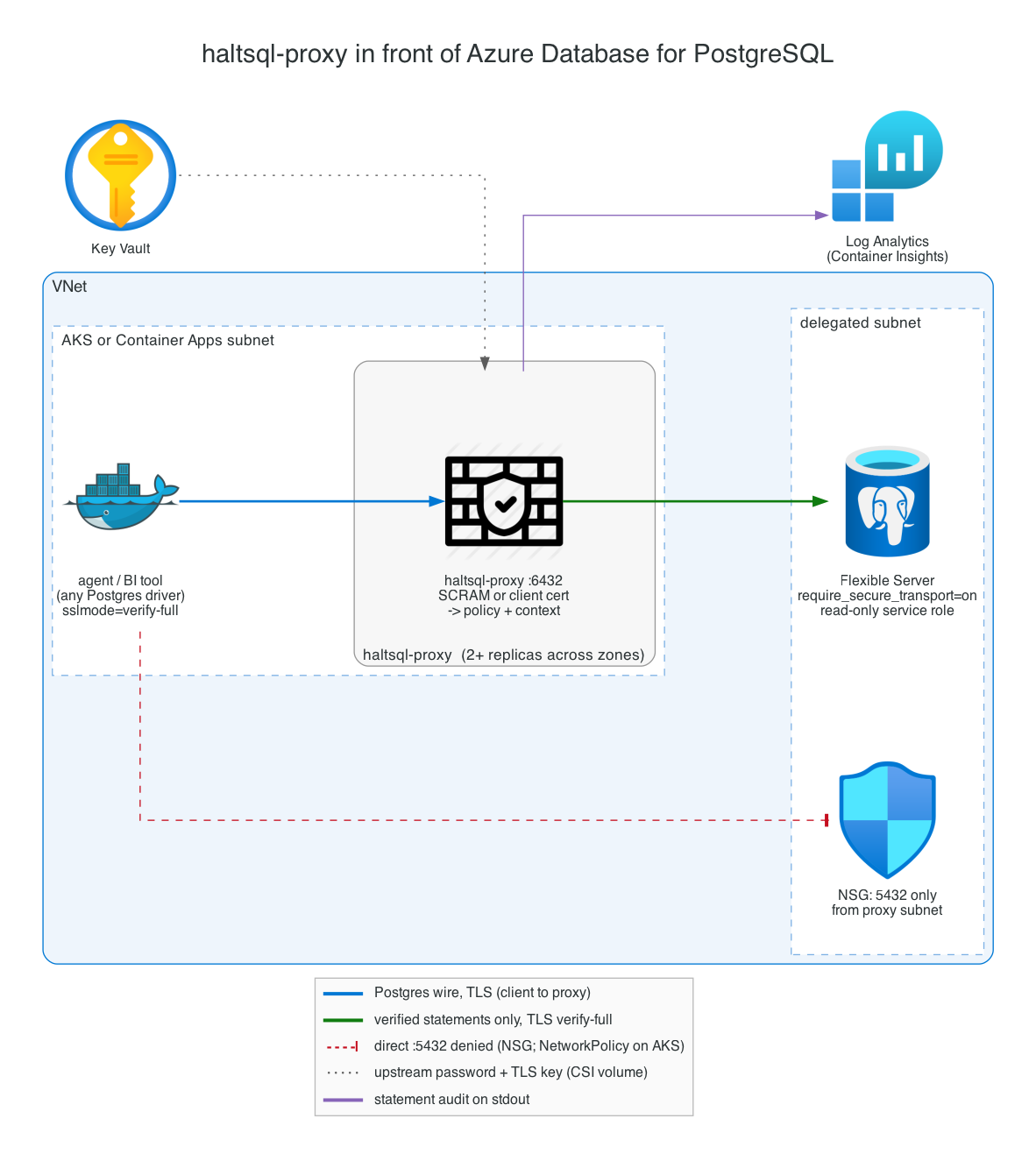
Use the proxy when the agent (or a BI tool) speaks plain Postgres and cannot
call /v1/verify. The proxy authenticates clients (SCRAM or client
certificates), maps each one to a policy and context, verifies every
statement, and forwards only allowed statements to Flexible Server over
verify-full TLS. See proxy.md.
aks/proxy.yaml runs two replicas
spread across zones, with secrets from Key Vault via CSI. The database side:
az postgres flexible-server create -g "$RG" -n "$PG" -l "$LOC" \
  --tier GeneralPurpose --sku-name Standard_D2ds_v5 --version 16 \
  --high-availability ZoneRedundant --zone 1 --standby-zone 2 \
  --vnet "$VNET" --subnet snet-postgres --private-dns-zone "$PG_DNS_ZONE"
# Turn on Microsoft Entra authentication for human and agent access
# (check `az postgres flexible-server create --help` for the flag names in
# your CLI version). The proxy's own upstream role uses a password; see below.

az postgres flexible-server parameter set -g "$RG" -s "$PG" \
  -n require_secure_transport --value on
- Create a dedicated read-only role for the proxy (
haltsql_service) withSELECTon the policy's tables only, and keep row-level security on (see defense-in-depth.md). Store its password in Key Vault aspg-haltsql-service-password. - Download the CA certificates that Flexible Server currently chains to
(DigiCert Global Root G2 and Microsoft RSA Root Certificate Authority 2017
at the time of writing; check Microsoft's "TLS/SSL with Azure Database for
PostgreSQL" page). Store them as the
azure-pg-caConfigMap. - On the NSG of the Flexible Server subnet, allow 5432 only from the subnet the proxy runs in. On AKS, also give agent pods a NetworkPolicy that blocks egress to 5432. Otherwise an agent can bypass the proxy.
Identity and least privilege
| Principal | Role | Scope |
|---|---|---|
| Agent's managed identity | Key Vault Secrets User | the agent's token secret only |
| Agent's managed identity | app role SQL.Verify on the haltsql app (shared-service patterns) | the app registration |
| Agent's managed identity | Entra database role on Flexible Server | the agent's database and schema |
| Shipper identity (may be the same MI) | Storage Blob Data Contributor, or a custom create-only role | the haltsql-audit container |
| Container Apps app identity | Key Vault Secrets User, AcrPull | its secrets; the registry |
| Proxy's identity (CSI only) | Key Vault Secrets User | proxy secrets |
haltsql-server | nothing | - |
Entra ID as the OIDC issuer
The shared-service patterns authenticate agents with Entra ID access tokens.
Each agent's managed identity gets a token for the haltsql app
registration. HaltSQL checks the issuer, audience, signature, expiry,
azp and roles claims, then pins the caller's policy.
Create the app registration once:
APP_ID=$(az ad app create --display-name haltsql --query appId -o tsv)
az ad app update --id "$APP_ID" --identifier-uris "api://$APP_ID"
# v2.0 tokens: iss = https://login.microsoftonline.com/<tenant>/v2.0, aud = APP_ID
az ad app update --id "$APP_ID" --set api.requestedAccessTokenVersion=2
cat > roles.json <<EOF
[{"allowedMemberTypes": ["Application"], "description": "Call HaltSQL /v1/verify",
  "displayName": "SQL.Verify", "isEnabled": true, "value": "SQL.Verify",
  "id": "$(uuidgen)"}]
EOF
az ad app update --id "$APP_ID" --app-roles @roles.json
az ad sp create --id "$APP_ID"
# Only identities with an assigned app role can get a token for this app.
az ad sp update --id "$APP_ID" --set appRoleAssignmentRequired=true

# Assign the role to an agent's managed identity.
HALTSQL_SP=$(az ad sp show --id "$APP_ID" --query id -o tsv)
ROLE_ID=$(az ad app show --id "$APP_ID" --query "appRoles[?value=='SQL.Verify'].id | [0]" -o tsv)
az rest --method POST \
  --uri "https://graph.microsoft.com/v1.0/servicePrincipals/$MI_PRINCIPAL_ID/appRoleAssignments" \
  --body "{\"principalId\":\"$MI_PRINCIPAL_ID\",\"resourceId\":\"$HALTSQL_SP\",\"appRoleId\":\"$ROLE_ID\"}"
The matching HaltSQL config (also in values-aks.yaml and
containerapps/haltsql/shared.yaml):
server:
  auth:
    oidc:
      - name: entra-analytics-agent
        issuer: https://login.microsoftonline.com/<TENANT_ID>/v2.0
        audiences: [<HALTSQL_APP_CLIENT_ID>]
        algorithms: [RS256]
        policy: analytics-agent              # pinned
        required_claims:
          azp: <AGENT_MI_CLIENT_ID>          # which identity
          roles: SQL.Verify                  # element of the roles array
        request_context_fields: [tenant_id]
Notes that are easy to get wrong:
- Token version. Without
requestedAccessTokenVersion = 2, Entra ID issues v1.0 tokens whoseissishttps://sts.windows.net/<tenant>/, and HaltSQL rejects them becauseissmust equalissuerexactly. (You could instead configure the v1 issuer, withjwks_uriset tohttps://login.microsoftonline.com/<tenant>/discovery/keysand the App ID URI as the audience. Do not mix the two.) - Selecting a policy.
policy_claimneeds a string claim, and Entra'srolesclaim is an array. Add one provider entry per agent identity instead: the same issuer, a differentrequired_claims.azp, and a pinnedpolicy. HaltSQL tries every provider whose issuer matches, in order, and uses the first that verifies. - Tenant context. App-only tokens carry no end-user tenant. Either list
tenant_idinrequest_context_fields(the agent sends it, as above), or use a separate identity per tenant with a static context. mTLS identities can carry a static context. - Egress. JWKS is fetched from
login.microsoftonline.com:443. Allow it in Azure Firewall, a Cilium FQDN policy or the NSG. If the keys cannot be refreshed for longer thanmin(jwks_cache_seconds, 3600)past expiry, requests get503 AUTH_UNAVAILABLE.
In the agent (Python, azure-identity):
from azure.identity import DefaultAzureCredential   # Workload Identity or managed identity
token = DefaultAzureCredential().get_token(f"api://{HALTSQL_APP_ID}/.default").token
requests.post(f"{HALTSQL_URL}/v1/verify", json=body,
              headers={"Authorization": f"Bearer {token}"}, timeout=2)
Networking
- No public endpoints. Use a private AKS cluster, an internal Container
Apps environment, Flexible Server with VNet integration (or a private
endpoint), and private endpoints for Key Vault, Blob and ACR, each with its
privatelink.*DNS zone linked to the VNet. Disable public network access on the vault and the storage account. - NSGs. On the Flexible Server subnet, allow inbound 5432 only from the
agent subnet (or only from the proxy subnet in Pattern 3). On the private
endpoint subnet, allow 443 only from the workload subnets. On the AKS or
Container Apps subnet, send egress through Azure Firewall (a UDR to the
firewall) with FQDN rules:
login.microsoftonline.com(Entra ID OIDC and token exchange), your Application Insights ingestion endpoint, andmcr.microsoft.complus your ACR for images. - Inside the cluster. The sidecar manifest lets only
kube-system(Managed Prometheus) reach port 8080 from outside the pod. The shared-service policy admits only theagentsnamespace. - HaltSQL's own traffic. The sidecar with static tokens makes no outbound
calls except OTLP to the collector. Entra ID authentication adds HTTPS to
login.microsoftonline.com. The proxy needs only Flexible Server.
TLS
| Hop | How |
|---|---|
| agent to sidecar | loopback inside the pod or replica; no TLS needed |
| agent to AKS shared service | built-in TLS (tls.enabled, minVersion: "1.3"); certificate from cert-manager or Key Vault (ESO); hot-reloaded on rotation |
| agent to Container Apps shared service | Container Apps ingress (managed certificate for the internal domain); turn on peer-to-peer encryption for traffic inside the environment |
agent to haltsql-proxy | proxy tls with required: true; clients use sslmode=verify-full |
| proxy or agent to Flexible Server | require_secure_transport=on; verify-full against the Azure CA bundle |
TLS files referenced by path (server.tls.cert, key, client_ca) are
watched and reloaded. Secrets read through ${file:...} placeholders are
read only at startup and on reload. See
Current limitations.
Audit retention
HaltSQL audit records are hash-chained JSON lines (see audit-sinks.md). There is no native Blob sink, so use one of these routes:
| Route | Byte-exact chain | Retention | Use for |
|---|---|---|---|
| file sink + Vector to Blob (AKS) | yes: Vector's text codec writes each line unchanged; concatenating a pod's blobs in name order reproduces the file | locked time-based immutability on the container | the compliance record |
| stdout to Log Analytics (AKS and Container Apps) | no: Container Insights parses JSON lines into columns, so the original bytes (and the hash input) are not guaranteed to survive | workspace and table retention, up to 12 years with long-term retention | search, dashboards, alerts |
| Log Analytics data export to Storage | no (as above) | immutability policy on the export container | low-effort archive when a verifiable chain is not required |
Operational notes for the file and Vector route:
- Each haltsql process has its own chain, and each pod writes under
haltsql/audit/<namespace>/<pod>/in Blob. When a pod restarts in place, the chain continues:fileresumes from the last line, and the emptyDir outlives container restarts. A new pod starts a new chain at genesis. - HaltSQL does not rotate the audit file. Size the emptyDir for the pod's
lifetime (the manifest uses 2 GiB; a record is about 400 bytes) and alert
on
haltsql_audit_errors_total. Withon_error: fail_closed, a full disk turns into503s rather than unaudited verifies. - Verify a day's chain by downloading one pod's blobs
(
az storage blob download-batch --auth-mode login ...), concatenating them in name order, and running the script in audit-sinks.md. - On Container Apps, only the stdout route is available. A shipper container
can share an
EmptyDirvolume, but replicas are replaced freely, so files are lost more often than on AKS.
Observability
| Signal | AKS | Container Apps |
|---|---|---|
| Metrics | Managed Prometheus scrapes /metrics through a PodMonitor (azmonitoring.coreos.com/v1); Managed Grafana for dashboards. OTLP metrics also go to App Insights through the collector. | OTLP metrics through the collector sidecar to App Insights. There is no Prometheus scraping. |
| Traces | OTLP/HTTP to the in-cluster OpenTelemetry Collector, then the azuremonitor exporter, then Application Insights | the same, with the collector as a sidecar on localhost:4318 |
| Logs | stderr JSON logs to Container Insights (ContainerLogV2) | ContainerAppConsoleLogs |
| Audit | see Audit retention | stdout to Log Analytics |
Spans never contain SQL text. Join a span to its audit record on
db.statement.sha256 = sql_sha256. Recommended alerts (Managed Prometheus
alert rules, or Log Analytics alerts on the OTLP metrics):
| Condition | Action |
|---|---|
rate(haltsql_audit_errors_total[5m]) > 0 | Page: the audit sink is failing, and with fail_closed requests get 503. |
rate(haltsql_policy_reload_total{result="error"}[5m]) > 0 | Warn: a bad policy was rejected, and the last good one is still active. |
haltsql_policies_loaded == 0 | Page: the pod is not ready. |
histogram_quantile(0.99, rate(haltsql_verify_duration_seconds_bucket[5m])) > 0.05 | Investigate latency. |
rate(haltsql_otlp_spans_dropped_total[5m]) > 0 | The collector is unreachable. Verification is unaffected. |
Vector component_errors_total{component_id="audit_blob"} | Blob shipping is failing. |
Scaling and high availability
- Zones. Use AKS node pools across zones 1, 2 and 3 with
topologySpreadConstraintsontopology.kubernetes.io/zone(in both manifests), a zone-redundant Container Apps environment, ZRS storage, and zone-redundant HA on Flexible Server. - Sidecar. It scales with the agent automatically. HaltSQL is stateless and CPU-bound. 50m CPU and 32 MiB of memory are enough for most agents.
- Shared service. At least 3 replicas on AKS (2 on Container Apps), with
a PDB
minAvailable: 2, an HPA on CPU (or the Container Apps HTTP concurrency rule), andmaxUnavailable: 0rolling updates (the chart's default). - Policy rollout. On AKS, ConfigMap updates are hot-reloaded
(
reload.watch). The swap is atomic, and a bad policy is rejected. On Container Apps, ship a new image revision and shift traffic with weights. Signed policy bundles (policy-bundles.md) work the same on both. - Failure mode. If HaltSQL is unavailable, agents must fail closed: run no SQL. The SDKs do this by default.
Cost notes
Prices change and vary by region, so these are relative.
- HaltSQL itself costs little: about 50m CPU and 32 MiB per sidecar, or
0.25 vCPU and 0.5 GiB per Container Apps replica. A shared service of three
small replicas is usually the cheapest option for dozens of agents. On
Container Apps, keeping
minReplicas: 2means you pay for idle time. - Log Analytics ingestion is usually the largest line item. An audit
record is about 400 bytes, so 10 million verifies a day is about 4 GB a day
of audit data, before application logs. Consider the Basic table plan for
ContainerLogV2, and keep the full-fidelity copy in Blob. - Blob with the Cool access tier is inexpensive for append-once audit data. Immutability policies cost nothing extra, but locked data cannot be deleted early, so set the retention period deliberately.
- Private endpoints are billed per hour and per GB. Azure Firewall has a significant fixed hourly cost. Share both through a hub VNet.
- Application Insights bills by ingestion. Sample traces in the collector
(
probabilistic_sampler) for high-volume agents. HaltSQL honors the caller's sampled flag. - Managed Prometheus bills by samples ingested. One scrape every 30 seconds per pod is negligible.
Production checklist
- Image imported into ACR, pinned by digest, signature verified.
- Policies validated and tested in CI;
mode: enforce(or a plannedshadowperiod first). -
allow_unauthenticated: false; every identity pinned to one policy. - Sidecar: the token in Key Vault, the agent mounts the token,
haltsqlmounts only the hash; Workload Identity skipped for thehaltsqlcontainer. - Shared service: Entra app with
requestedAccessTokenVersion = 2,appRoleAssignmentRequired = true, one provider per agent (azp+roles); TLS 1.3 on; egress tologin.microsoftonline.comallowed. - Key Vault: RBAC mode, purge protection, private endpoint, per-secret role assignments.
- Storage: private endpoint, shared key access disabled, immutability policy locked after testing, shipper scoped to one container.
-
audit.log_raw_sql: falseunless approved;on_error: fail_closed. - Flexible Server: private access only,
require_secure_transport=on, zone-redundant HA, agent roles with least privilege, RLS on. - Agents cannot reach 5432 directly when the proxy is the enforcement point.
- NetworkPolicies (AKS) and NSGs in place; network policy engine enabled.
- Alerts on audit errors, reload errors and readiness; Blob shipping errors alerted.
- Tested: a denied query never runs; HaltSQL down means the agent runs nothing; secret rotation procedure rehearsed (see below).
- A chain verified end to end from Blob with the verification script.
Current limitations on Azure
These are gaps in HaltSQL itself, not configuration choices. Each has a workaround above.
| Gap | Status | Workaround |
|---|---|---|
Azure Key Vault secret provider (a ${azure-kv:...} placeholder) | Not supported natively yet. Supported schemes are env, file, vault, aws-sm and gcp-sm. | Key Vault CSI driver (AKS) or Container Apps Key Vault references, read via ${file:...}. Or HashiCorp Vault with Azure auth. |
| Azure Blob Storage audit sink | Not supported natively yet. Object sinks are s3 and gcs only. Azure Blob has no S3-compatible API, so the s3 sink's endpoint cannot target it. | file sink plus a Vector azure_blob shipper (Vector 0.55.0 or later for Workload Identity), or stdout plus Log Analytics export. |
| Managed identity / Workload Identity credentials | Not supported natively yet. HaltSQL has credential chains only for AWS (env, IRSA, IMDSv2) and GCP (metadata, key file). | HaltSQL needs no Azure credential in the patterns above. Identity belongs to the CSI driver, the platform and the shipper. |
| Azure Monitor exporter | Not supported natively yet. Telemetry is Prometheus plus OTLP over HTTP with JSON encoding only. | OpenTelemetry Collector (otlp receiver, azuremonitor exporter) in the cluster or as a sidecar. |
| Container Apps managed OpenTelemetry agent | Incompatible: it accepts gRPC only, and HaltSQL exports OTLP/HTTP. | Collector sidecar on localhost:4318. |
Secret rotation for ${file:...} values | Files referenced by placeholders are read at startup and on reload (SIGHUP, or a change to a watched config, policy or TLS file), not watched. The distroless image has no shell to send SIGHUP from a sidecar. | Add the new token hash as a second token entry, roll the pods (kubectl rollout restart, or a new Container Apps revision), then remove the old entry. TLS files referenced by path are watched. |
| Audit file rotation | The file sink appends forever. | Size the volume for the pod's lifetime; rely on pod replacement; alert on audit errors. |
Entra roles as the policy selector | policy_claim requires a string claim, and roles is an array. | One OIDC provider entry per identity, keyed by azp, with a pinned policy. |
| Helm chart on AKS | No extraVolumes, extraEnv or extraContainers (so no CSI volume and no shipper sidecar); no telemetry.otlp value; the NetworkPolicy blocks the egress that OIDC needs; the ServiceMonitor uses monitoring.coreos.com, not azmonitoring.coreos.com. | Use the raw sidecar manifest; for the chart, use values-aks.yaml plus networkpolicy-shared.yaml (Managed Prometheus scraping instead of OTLP), and ESO or cert-manager for TLS. |
haltsql-proxy upstream Entra ID auth | Not supported. The upstream password is read once at startup, and Entra tokens expire after about an hour. | A password-authenticated, read-only service role, with the password in Key Vault via CSI. |
haltsql-proxy operations | No metrics endpoint and no HTTP health endpoint. Audit goes only to stdout or file. | TCP probes; the audit stream in Log Analytics. |
| Byte-exact chain via Log Analytics | Container Insights parses JSON log lines, so the exact bytes are not guaranteed to be preserved. | Use the file and Blob route for the verifiable record. |
Console
To run haltsql-console (the control plane) next to these deployments: on
AKS with the haltsql-console chart, Workload Identity, the Key Vault CSI
driver for its secrets (Key Vault is not a console secrets provider yet), an
Azure Files share for the verifiers' audit files, Entra ID sign-in through an
oauth2-proxy sidecar behind Application Gateway, and an Azure Disk for its
state; or on Azure Container Apps as a single replica with Azure Files. See
console/deploy.md and
deploy/cloud/azure/console/. Each
verifier needs server.admin enabled with the console's token in
server.admin.callers.
Regenerating the diagrams
The architecture images on this page are drawn as code with
mingrammer/diagrams, one script per
diagram: deploy/diagrams/azure_*.py. Every other
diagram on this page is Mermaid, inline in the Markdown. You need Graphviz
(dot). From the repository root:
make diagrams                                     # every cloud, in a managed virtualenv
deploy/diagrams/.venv/bin/python deploy/diagrams/azure_<name>.py   # one diagram
Each script writes the matching docs/assets/cloud/azure-<name>.png. Commit
the PNG together with the script change. See
deploy/diagrams/README.md for the shared style.