Deploying on AWS
This guide covers four ways to run HaltSQL on AWS:
haltsql-serveras a sidecar on Amazon EKS;haltsql-serveras a shared service on EKS or on Amazon ECS (Fargate);haltsql-proxyin front of Amazon RDS or Aurora PostgreSQL.
It covers IAM, networking, TLS, the S3 Object Lock audit trail, observability, scaling and cost.
The manifests, task definitions, IAM policies and a small Terraform module
are in deploy/cloud/aws/. The
general deployment guide is deployment.md, and the trade-offs
between the modes are explained in
how-it-works/deployment-modes.md.
haltsql-server never connects to the database. On AWS it makes at most
these outbound calls:
| Call | When | Config |
|---|---|---|
STS AssumeRoleWithWebIdentity | IRSA credentials, refreshed 5 minutes before they expire | credentials: { source: web_identity }; the ${aws-sm:..} chain |
| EC2 IMDSv2 | instance-profile credentials | credentials: { source: instance }; the ${aws-sm:..} chain |
Secrets Manager GetSecretValue | at startup and on every reload | ${aws-sm:<id>[#key]} + secrets.aws.region |
S3 PutObject | one object per audit batch | audit.sinks[].type: s3 |
| OIDC discovery / JWKS | OIDC callers, cached | server.auth.oidc |
| OTLP/HTTP | traces and metrics export | telemetry.otlp |
Terraform. To provision these patterns as code, use the modules in
deploy/terraform(terraform.md):haltsql-awsrunshaltsql-serveron ECS on Fargate, andhaltsql-kubernetesinstalls the Helm chart on any cluster. This guide explains the architecture and the settings those modules expose; the manifests indeploy/cloud/aws/are the equivalent by hand.
Choosing a pattern
| Pattern | Pick it when | Enforcement | Audit on AWS |
|---|---|---|---|
| A. EKS sidecar | Agents run on EKS. This is the default recommendation. | The agent (or the SDK's guarded execute) acts on the verdict. | S3 Object Lock, using IRSA. |
| B. EKS shared service (Helm) | Many agents on EKS, with central policy rollout. | Same as A, with one network hop. | S3 Object Lock, using IRSA. |
| C. ECS Fargate shared service | Agents on ECS, Lambda or EC2 call one internal endpoint. | Same as A. | CloudWatch Logs (stdout). See Audit on ECS. |
D. haltsql-proxy in front of RDS | You cannot change the client (BI tools, vendor agents), or you do not trust the app to honor verdicts. | The proxy. The database is reachable only through it. | CloudWatch Logs (stdout). |
Whichever pattern you choose, keep the database-side controls: a
least-privilege role, default_transaction_read_only for read-only agents,
and row-level security (defense-in-depth.md).
What HaltSQL supports on AWS
Only the features below exist in the code (lib/cloud/). Each limitation
noted here shapes the patterns that follow.
| Area | Supported | Not supported (today) |
|---|---|---|
| Credentials | env (AWS_ACCESS_KEY_ID/AWS_SECRET_ACCESS_KEY/AWS_SESSION_TOKEN), static (from the config, through secret placeholders), web_identity (IRSA: AWS_WEB_IDENTITY_TOKEN_FILE + AWS_ROLE_ARN), instance (EC2 IMDSv2) | The ECS task role (container credentials, AWS_CONTAINER_CREDENTIALS_RELATIVE_URI), EKS Pod Identity (AWS_CONTAINER_CREDENTIALS_FULL_URI), shared config/profile files, SSO |
| Secrets | ${aws-sm:<secret-id>[#json-key]} placeholders, resolved at startup and on each reload, with the chain env → web_identity → instance | Rotation without a reload (send SIGHUP, or let reload.watch see a file change) |
| Audit | s3 sink: SigV4, create-only PUTs, Content-MD5 + SHA-256 checksums, Object Lock headers, spool directory, fail_closed or buffer | SSE-KMS headers per object (use bucket default encryption instead), Firehose or CloudWatch sinks |
| Telemetry | OTLP/HTTP (JSON) to any collector; Prometheus /metrics | SigV4-signed OTLP straight to X-Ray or CloudWatch (send it through an ADOT collector) |
| Proxy | Upstream password and SCRAM verifiers from ${env:}/${file:}; upstream tls.mode: verify-full against the RDS CA bundle | ${aws-sm:}, S3 audit, metrics, RDS IAM database authentication, TLS key/cert as inline PEM (they must be files) |
Note that the S3 sink's credentials.source defaults to env, not to the
chain. On EKS, set credentials: { source: web_identity } explicitly.
Prerequisites
-
A VPC with private subnets in at least two Availability Zones.
-
For private subnets without a NAT gateway, these VPC endpoints:
com.amazonaws.<region>.sts(interface, needed for IRSA);secretsmanager(interface);s3(gateway);logs(interface);- for ECS:
ecr.api,ecr.dkr; - for ADOT:
xray,aps-workspaces.
-
The image
ghcr.io/haltsql/haltsql:<version>, mirrored to ECR if your nodes cannot reach GHCR. Verify its cosign signature and pin it by digest (deployment.md). -
An audit bucket with Object Lock.
deploy/cloud/aws/terraform/creates it, together with its KMS key, the least-privilege policy and an optional IRSA role:cd deploy/cloud/aws/terraformterraform initterraform apply \-var audit_bucket_name=corp-haltsql-audit \-var 'secret_arns=["arn:aws:secretsmanager:eu-west-1:111122223333:secret:prod/haltsql/tokens-??????"]' \-var 'irsa={oidc_provider_arn="arn:aws:iam::111122223333:oidc-provider/oidc.eks.eu-west-1.amazonaws.com/id/EXAMPLE",oidc_issuer_host="oidc.eks.eu-west-1.amazonaws.com/id/EXAMPLE",namespace="agents",service_account="analytics-agent"}' -
Policies validated and tested in CI (
haltsql validate,haltsql test, see policy-ci.md).
A. EKS sidecar
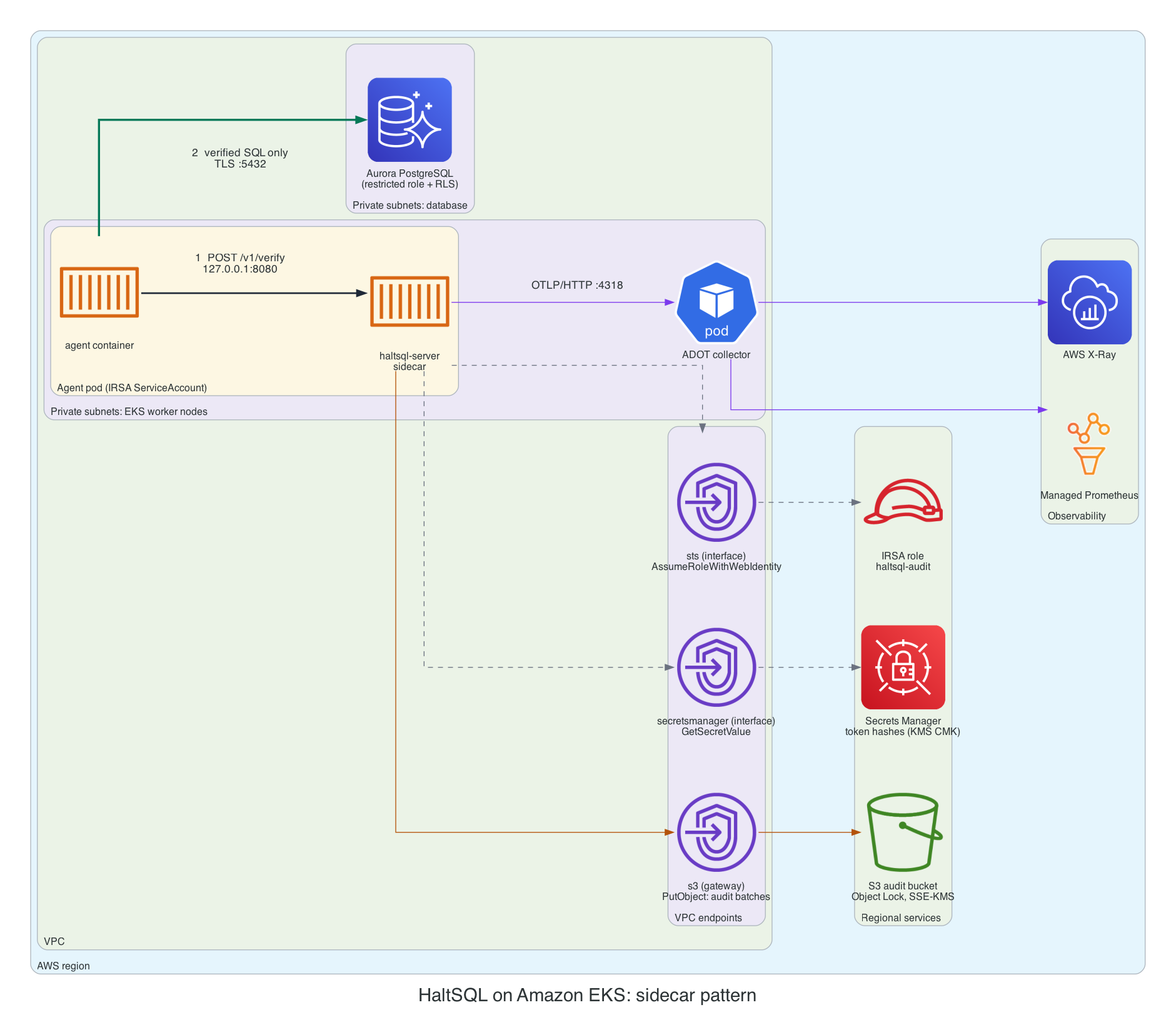
Each agent pod gets a haltsql container. The agent calls
http://127.0.0.1:8080/v1/verify, so verification never leaves the pod. Only
the agent talks to Aurora. The sidecar uses IRSA for these calls:
- STS, to obtain credentials;
- Secrets Manager, to read the token hashes;
- S3, to write audit batches.
It also sends OTLP to an ADOT collector.
Steps
-
IAM role. Attach
deploy/cloud/aws/iam/haltsql-policy.json(or the Terraformpolicy_arn) to a role. Its trust policy (iam/irsa-trust-policy.json) must allow exactlysystem:serviceaccount:agents:analytics-agentwith audiencests.amazonaws.com. -
Secrets. Store the token hashes as one JSON secret. The agent keeps the raw token; the sidecar sees only the hash.
TOKEN="$(openssl rand -hex 32)"aws secretsmanager create-secret --name prod/haltsql/tokens \--kms-key-id alias/haltsql-secrets \--secret-string "{\"analytics-agent\":\"$(printf '%s' "$TOKEN" | sha256sum | cut -d' ' -f1)\"}"kubectl -n agents create secret generic analytics-agent-haltsql --from-literal=token="$TOKEN" -
Config.
deploy/cloud/aws/eks/sidecar.yamlcontains the full config. The AWS-specific parts are:server:auth:tokens:- name: analytics-agenttoken_sha256: ${aws-sm:prod/haltsql/tokens#analytics-agent}policy: analytics-agentaudit:sinks:- type: s3bucket: corp-haltsql-auditregion: eu-west-1prefix: haltsql/audit/analytics-agent/object_lock: { mode: COMPLIANCE, retain_days: 365 }credentials: { source: web_identity }spool_dir: /var/lib/haltsql/spoolon_error: fail_closedtelemetry:otlp:endpoint: http://adot-collector.observability:4318service_name: haltsql-analytics-agentsecrets:aws:region: eu-west-1 -
ServiceAccount and pod. Annotate the ServiceAccount with
eks.amazonaws.com/role-arn. Annotate the pod witheks.amazonaws.com/skip-containers: agent, so that only thehaltsqlcontainer receives the web-identity token and theAWS_*variables. The agent then cannot write audit objects or read the hashes. Mount the ConfigMaps as directories, not withsubPath, so thatreload.watchsees policy updates. -
Apply and check.
kubectl apply -f deploy/cloud/aws/eks/sidecar.yamlkubectl -n agents logs deploy/analytics-agent -c haltsql | head # "policies loaded", no credential errorsaws s3 ls s3://corp-haltsql-audit/haltsql/audit/analytics-agent/ --recursive | tail
A startup error such as aws-sm: no AWS credentials found (...) or STS returned HTTP 403 AccessDenied stops the pod with exit code 2. Check the
role's trust policy (namespace, ServiceAccount name and audience) and the STS
endpoint.
B. EKS shared service (Helm)
Use the chart in deploy/helm/haltsql with the overlay
deploy/cloud/aws/eks/values-eks.yaml:
helm upgrade --install haltsql deploy/helm/haltsql -n haltsql --create-namespace \
  -f deploy/cloud/aws/eks/values-eks.yaml \
  --set-file 'policies.analytics-agent\.yaml=policies/analytics-agent.yaml'
kubectl apply -n haltsql -f deploy/cloud/aws/eks/networkpolicy-shared.yaml
The overlay does the following:
- annotates the chart's ServiceAccount with the IRSA role;
- renders an
s3sink withcredentials: { source: web_identity }and a spool in the chart's/var/log/haltsqlemptyDir; - turns on built-in TLS from a cert-manager Secret (for example issued by AWS
Private CA through
aws-privateca-issuer); - runs three or more replicas spread across zones, with a PDB and an HPA.
Limitations of the chart on AWS:
- NetworkPolicy. The chart's NetworkPolicy denies all egress. With an S3
sink that blocks STS and S3, and with
fail_closedevery request then gets503. The overlay setsnetworkPolicy.enabled: falseand shipsnetworkpolicy-shared.yamlinstead, which allows DNS, HTTPS to the VPC endpoints, and OTLP. The policy is only enforced if the VPC CNI's network-policy agent (or Calico or Cilium) is enabled. - No
secretsortelemetry.otlpvalues. The chart cannot rendersecrets.awsortelemetry.otlp, so${aws-sm:..}placeholders and OTLP export are not available through it. Feed the token hashes in withexistingTokenSecret, a Secret synced from Secrets Manager (for example by External Secrets Operator). Get metrics by scraping/metricswith ADOT or an Amazon Managed Service for Prometheus scraper. If you need OTLP traces, use the sidecar manifest style (a hand-written ConfigMap).
Agents reach the service at https://haltsql.haltsql.svc:8080, and need the
cluster CA that signed haltsql-tls.
C. ECS Fargate shared service
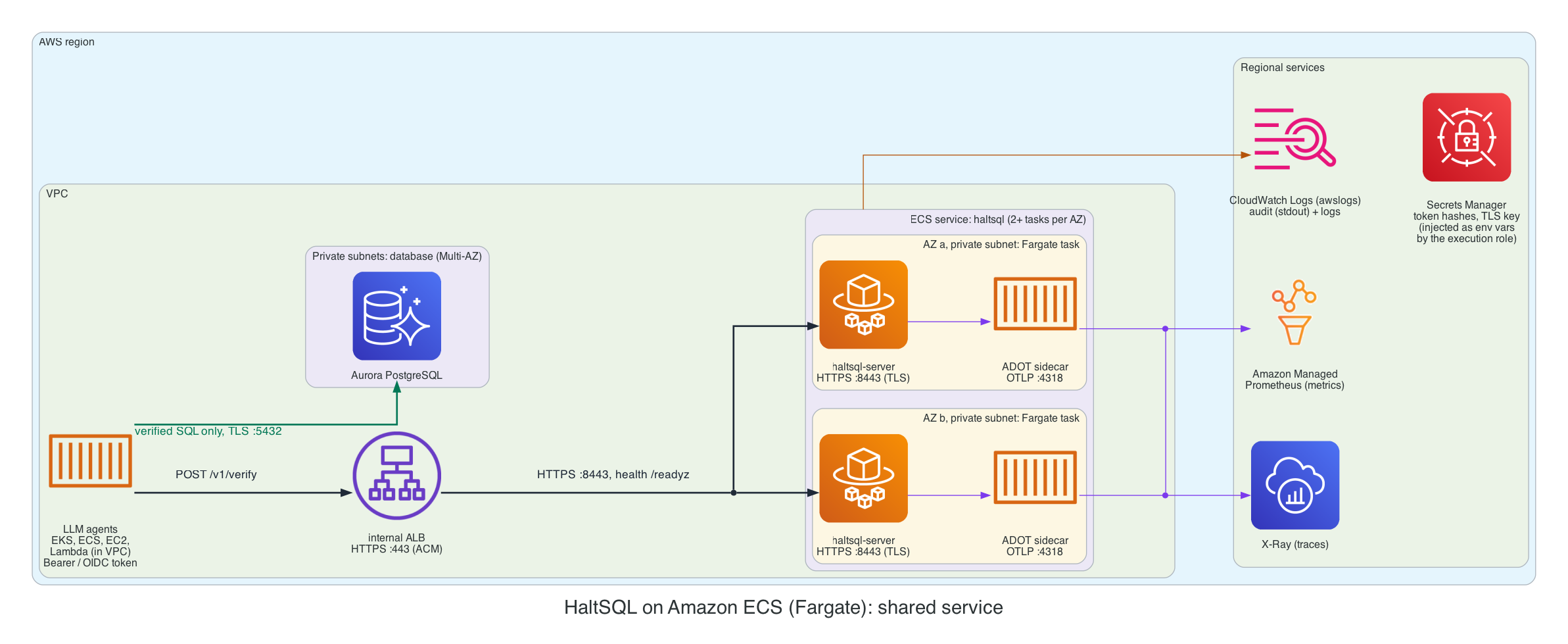
An internal Application Load Balancer spreads requests over haltsql-server
tasks in two or more AZs. Each task runs the server and an ADOT collector
sidecar.
Steps
-
Bake config and policies into an image. ECS has no ConfigMaps. The distroless image has no shell, so the config cannot be written at start-up.
deploy/cloud/aws/ecs/Dockerfileaddsconfig.yamlandpolicies/to the official image. Each policy change becomes a new image digest, which leaves a clean audit trail. Signed policy bundles (policies: [{bundle: ..., public_keys: [...]}]) work the same way.docker build -f deploy/cloud/aws/ecs/Dockerfile -t "$ECR/haltsql-config:$(git rev-parse --short HEAD)" deploy/cloud/aws/ecsdocker push "$ECR/haltsql-config:$(git rev-parse --short HEAD)" -
Secrets. The ECS task role cannot be used by HaltSQL today (see What HaltSQL supports), so do not use
${aws-sm:..}on Fargate. Instead, let ECS inject secrets as environment variables and reference them with${env:..}. ECS fetches them with the execution role (iam/ecs-task-execution-policy.json)."secrets": [{ "name": "HALTSQL_TOKEN_ANALYTICS_AGENT_SHA256","valueFrom": "arn:aws:secretsmanager:eu-west-1:111122223333:secret:prod/haltsql/tokens-AbCdEf:analytics-agent::" },{ "name": "HALTSQL_TLS_KEY","valueFrom": "arn:aws:secretsmanager:eu-west-1:111122223333:secret:prod/haltsql/tls-GhIjKl:key::" }]server.tls.certandserver.tls.keyaccept inline PEM, socert: ${env:HALTSQL_TLS_CERT}works. Rotated secrets are picked up when ECS starts new tasks (force a new deployment). -
Task definition. See
deploy/cloud/aws/ecs/task-definition.json. In it:HALTSQL_LISTEN=0.0.0.0:8443. The image setsHALTSQL_LISTEN, and environment variables override the config file.- The task runs as
user: 65532:65532withreadonlyRootFilesystem. - Logs use
awslogsinblockingmode, so that audit lines on stdout are never dropped. stopTimeout: 30.- It runs on ARM64 (Graviton).
- The ADOT container runs the built-in
/etc/ecs/ecs-amp-xray.yamlconfig (OTLP in; X-Ray and AMP remote-write out). It uses the task role (iam/adot-task-role-policy.json), because the collector supports container credentials.
-
Load balancer. Create an internal ALB with an HTTPS :443 listener and an ACM certificate (from AWS Private CA or a public certificate for a private hosted zone name). Add a target group with:
- protocol HTTPS, port 8443, target type
ip; - health check
GET /readyz, matcher200, interval 10 s; - deregistration delay 30 s.
The ALB does not validate target certificates, so a private-CA certificate on the tasks is enough to encrypt ALB → task traffic.
- protocol HTTPS, port 8443, target type
-
Service. Set the desired count to at least 2 per AZ that you use, with:
minimumHealthyPercent: 100,maximumPercent: 200;- the deployment circuit breaker with rollback;
- Service Auto Scaling on
ECSServiceAverageCPUUtilization(about 60%) orALBRequestCountPerTarget.
Audit on ECS
On Fargate there is no IMDS, and HaltSQL cannot use the task role, so the S3 sink has no good credential source. The choices, best first:
stdout→ CloudWatch Logs (the reference setup). Records are still hash-chained per task, so tampering is detectable when you export a stream and verify it (audit-sinks.md). Encrypt the log group with KMS. Set its retention to your compliance period. Restrictlogs:DeleteLogStreamandlogs:PutRetentionPolicywith an SCP. If you need WORM storage, export or subscribe the log group to an Object Lock bucket.- Run haltsql on EKS (pattern B) or on EC2. Use the S3 sink with
web_identityorinstancecredentials. credentials: { source: static }, with keys of a dedicated IAM user that holds only thes3:PutObject/s3:PutObjectRetentionstatement, injected from Secrets Manager. This works, but it means long-lived keys to rotate. Use it only as a stopgap.
D. haltsql-proxy in front of RDS
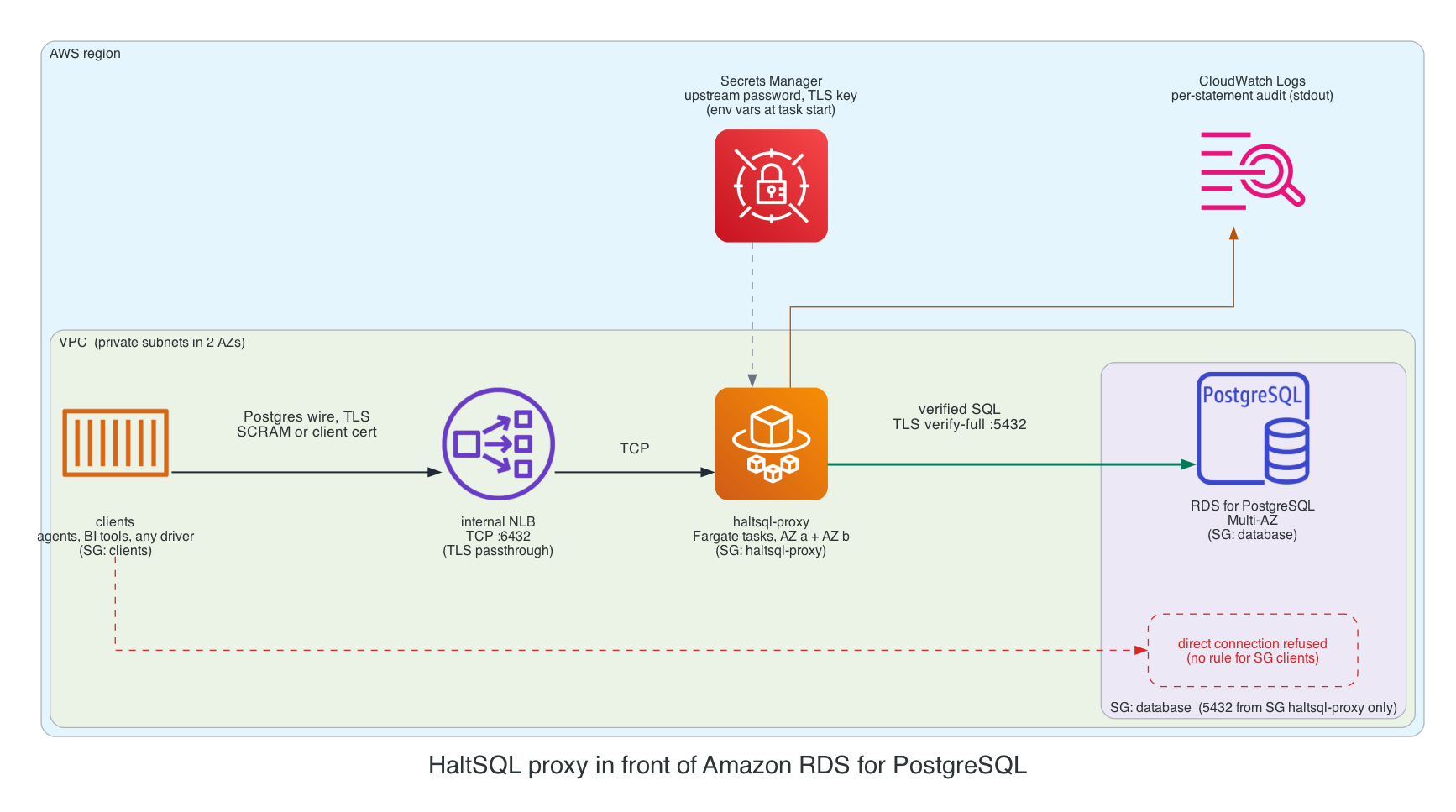
Clients connect to an internal Network Load Balancer on TCP 6432. The NLB
forwards to haltsql-proxy tasks. The proxy authenticates the client
(SCRAM or client certificate), verifies every Query and Parse, and
rewrites tenancy parameters in every Bind. It then forwards the SQL over
TLS (verify-full) to RDS. The database security group admits port 5432
only from the proxy's security group, so clients have no path that
bypasses the proxy.
- TLS must pass through the NLB. Use a TCP listener, not a TLS listener.
PostgreSQL negotiates TLS in-band after an
SSLRequest, so the NLB cannot terminate it. The proxy'stls.certandtls.keymust be files. Inecs/proxy-task-definition.json, a short-lived init container writes them from injected secrets to a task-scoped volume. On EKS, mount them with the Secrets Store CSI driver (AWS provider) instead. - Upstream. Use
upstream.tls: { mode: verify-full, ca: ./rds-global-bundle.pem }. Bake the public RDS CA bundle into the derived image (ecs/Dockerfile.proxy). Setrds.force_ssl = 1in the DB parameter group, and use a dedicated least-privilegeupstream.user. RDS IAM database authentication is not supported; the password comes from${env:UPSTREAM_PASSWORD}. - Health checks. Use a TCP health check on 6432. The proxy has no HTTP health or metrics endpoint.
- Audit. One JSON line per statement on stdout, going to CloudWatch Logs.
- Clients use prepared statements for tenant-scoped queries (proxy.md).
IAM: least privilege
deploy/cloud/aws/iam/haltsql-policy.json is the whole policy for
haltsql-server (patterns A and B):
{
  "Version": "2012-10-17",
  "Statement": [
    {
      "Sid": "WriteAuditObjectsUnderPrefix",
      "Effect": "Allow",
      "Action": ["s3:PutObject", "s3:PutObjectRetention"],
      "Resource": "arn:aws:s3:::corp-haltsql-audit/haltsql/audit/*"
    },
    {
      "Sid": "ReadHaltsqlSecrets",
      "Effect": "Allow",
      "Action": "secretsmanager:GetSecretValue",
      "Resource": [
        "arn:aws:secretsmanager:eu-west-1:111122223333:secret:prod/haltsql/tokens-??????",
        "arn:aws:secretsmanager:eu-west-1:111122223333:secret:prod/haltsql/otel-??????"
      ]
    },
    {
      "Sid": "UseCustomerManagedKeyViaS3AndSecretsManager",
      "Effect": "Allow",
      "Action": ["kms:Decrypt", "kms:GenerateDataKey"],
      "Resource": "arn:aws:kms:eu-west-1:111122223333:key/00000000-0000-0000-0000-000000000000",
      "Condition": {
        "StringEquals": {
          "kms:ViaService": [
            "s3.eu-west-1.amazonaws.com",
            "secretsmanager.eu-west-1.amazonaws.com"
          ]
        }
      }
    }
  ]
}
Notes on the policy:
- No read, list or delete on the bucket. HaltSQL only PUTs, with
If-None-Match: *, so it cannot overwrite an object either.s3:PutObjectRetentionis needed because each PUT carries Object Lock headers. kms:GenerateDataKeyis required to write objects into an SSE-KMS bucket. Turn on S3 Bucket Keys to cut KMS request costs.- Secret ARNs end in
-??????. That matches the random suffix that Secrets Manager adds to the name, and only that suffix. - Use one role per agent in pattern A, each with its own audit prefix, so that one compromised pod cannot write into another agent's prefix.
- Trust policy. Pin both
:sub(namespace and ServiceAccount) and:aud(sts.amazonaws.com).
For ECS, the execution role needs secretsmanager:GetSecretValue (plus
kms:Decrypt with kms:ViaService for Secrets Manager) on the injected
secrets, together with AmazonECSTaskExecutionRolePolicy for ECR and logs.
Networking and security groups
| Security group | Inbound | Outbound |
|---|---|---|
agents | as your app needs | 443 to alb-haltsql (C); 5432 to db (A–C); 6432 to nlb-proxy (D) |
alb-haltsql (C) | 443 from agents | 8443 to haltsql |
haltsql (C) | 8443 from alb-haltsql | 443 to the VPC endpoints (Secrets Manager, ECR, logs, X-Ray, AMP) |
haltsql-proxy (D) | 6432 from the NLB (or from agents when the NLB preserves client IPs) | 5432 to db; 443 to VPC endpoints |
db | 5432 from agents (A–C), only from haltsql-proxy (D) | none |
vpce | 443 from haltsql, haltsql-proxy, EKS nodes | none |
More rules:
- EKS nodes. Set the IMDSv2 hop limit to 1 in the node launch template, so that pods cannot reach the node role through IMDS. Pods that need AWS use IRSA. Without this, the agent container in pattern A could borrow the node's credentials.
- Kubernetes NetworkPolicy. Keep a no-ingress policy on agent pods
(pattern A). For pattern B, use
networkpolicy-shared.yaml. When you rely on an S3 gateway endpoint, egress rules also need the S3 prefix-list CIDRs. - Load balancers stay internal. HaltSQL is never exposed to the internet.
TLS options
| Hop | Option |
|---|---|
| Agent → sidecar (A) | Plain HTTP on loopback inside the pod. Tokens are still required. |
| Agent → service (B) | Built-in TLS (tls.enabled, cert-manager + AWS Private CA). Probes move to the plain-HTTP health port. |
| Agent → ALB → task (C) | An ACM certificate on the ALB, then HTTPS to the task's built-in TLS. Callers authenticate with static tokens or OIDC bearer tokens, which pass through the ALB. |
| mTLS identities | Need the client certificate at haltsql-server itself. ALB terminates TLS, and its mTLS mode passes the certificate in an HTTP header that HaltSQL does not read. So use an NLB with a TCP listener (TLS passthrough) to the tasks, with server.tls.client_ca and client_auth: required, plus --health-listen for health checks. |
| Client → proxy (D) | Proxy TLS through an NLB TCP listener; tls.required: true. |
| Proxy → RDS (D) | upstream.tls.mode: verify-full with the RDS CA bundle. |
For OIDC on AWS, use an IdP whose access tokens carry an aud claim that
matches audiences (for example Okta, Entra ID or Auth0). Amazon Cognito
access tokens carry client_id instead of aud, so check your token's
claims before you rely on Cognito. The server must reach the issuer's JWKS
URL over HTTPS (NAT or proxy egress).
Audit bucket with Object Lock
The Terraform module creates the bucket with:
- Object Lock, enabled at creation (it cannot be added later), with a default retention that backs up the per-object retention HaltSQL sends;
- versioning;
- SSE-KMS with a Bucket Key;
- Block Public Access and
BucketOwnerEnforcedownership; - a bucket policy that denies non-TLS requests;
- a lifecycle rule that moves objects to Glacier Instant Retrieval after 90 days.
Pick the lock mode:
COMPLIANCEcannot be shortened or removed by anyone, the root user included, until the retention date. Use it for regulatory retention. Test with a shortretain_daysfirst.GOVERNANCEcan be bypassed by principals withs3:BypassGovernanceRetention. Use it while you are still tuning.
Keep the sink's object_lock.retain_days equal to the bucket default.
For chain continuity across restarts, give every S3 sink a spool_dir. In
Kubernetes an emptyDir survives container restarts but not pod rescheduling.
A new pod starts a new chain under its own <run> id, which is expected and
verifiable. Object Lock makes the earlier runs undeletable, which covers the
gap that a missing spool would otherwise leave
(audit-sinks.md).
To verify a day's audit trail for one host:
aws s3 cp --recursive s3://corp-haltsql-audit/haltsql/audit/analytics-agent/2026/11/08/ ./audit/
find ./audit -name 'analytics-agent-7f9c-*.jsonl' | sort | xargs cat > day.jsonl
python3 verify_chain.py day.jsonl      # script in docs/audit-sinks.md
Observability
| Signal | Pattern A/B | Pattern C | Pattern D |
|---|---|---|---|
| Traces | OTLP → ADOT collector (EKS add-on) → X-Ray | OTLP → ADOT sidecar → X-Ray | none |
| Metrics | /metrics scraped by ADOT or an AMP managed scraper; or OTLP → ADOT → AMP | OTLP → ADOT → AMP | none (audit stream only) |
| Logs | stderr → Fluent Bit / CloudWatch Observability add-on → CloudWatch Logs | awslogs → CloudWatch Logs | awslogs → CloudWatch Logs |
| Audit | S3 Object Lock | CloudWatch Logs (stdout) | CloudWatch Logs (stdout) |
HaltSQL's OTLP exporter does not sign requests with SigV4, so it cannot post
directly to the X-Ray or CloudWatch OTLP endpoints. Always send it through an
ADOT (or other OpenTelemetry) collector. The SQL text is never exported in
spans; join spans to audit records on db.statement.sha256 = sql_sha256.
Alarms, as AMP alerting rules or CloudWatch alarms (observability.md):
haltsql_audit_sink_healthy == 0, orrate(haltsql_audit_sink_rejected_writes_total[5m]) > 0: S3 writes are failing, and withfail_closedrequests are answered with 503.rate(haltsql_audit_sink_upload_failures_total[5m]) > 0: an early warning (for exampleAccessDeniedafter an IAM change).rate(haltsql_policy_reload_total{result="error"}[5m]) > 0.histogram_quantile(0.99, rate(haltsql_verify_duration_seconds_bucket[5m])) > 0.05.- ALB:
HTTPCode_Target_5XX_Count,UnHealthyHostCount. - ECS: running task count below desired.
Scaling and high availability
- Statelessness.
haltsql-serveris stateless and CPU-bound. A verification typically takes well under a millisecond, so a sidecar needs50mCPU and64Miof memory as a request. Scale shared services on CPU. - Spread across AZs. Use
topologySpreadConstraintsontopology.kubernetes.io/zone(B), or two or more subnets in different AZs (C, D). Keep a PDB (minAvailable: 2) or ECSminimumHealthyPercent: 100. - Readiness (
/readyz) means that at least one policy is loaded. A failed hot reload keeps the last good policies and does not make the task unready. fail_closedversusbuffer. Withfail_closed(the default), an S3 or STS outage turns into 503s once uploads have failed every attempt. Clients must treat those as denials. If availability matters more, chooseon_error: buffer: records are held in memory, up tomax_buffer_records, and never dropped, and writes are refused only when the buffer is full. With a spool directory, held records also survive a crash.- Graceful shutdown.
SIGTERMstops accepting connections, finishes in-flight requests, and flushes the last audit batch. KeepterminationGracePeriodSeconds/stopTimeoutat 20–30 s, and at least as long as the ALB deregistration delay. - Secret rotation. Rotated Secrets Manager values are read on the next
reload (
SIGHUPor a config-file change) or on the next pod or task start.
Cost notes
- Sidecar overhead is one small container per agent pod. A shared service is cheaper with many small agents, at the price of a network hop.
- Fargate on ARM64 (Graviton) costs less than x86 for the same vCPU and memory. The image is multi-arch.
- Interface VPC endpoints are billed per endpoint, per AZ, per hour, plus data processed. Share them across workloads in the VPC. The S3 gateway endpoint is free.
- S3 PUT requests. Each sink in each replica uploads at most one object
per
batch.max_seconds(default 10 s) while traffic flows, or one per 500 records. That is at most about 8,640 PUTs per replica per day. Raisemax_secondsto cut requests; records are spooled in the meantime. - CloudWatch Logs ingestion is usually the largest cost when audit goes
to stdout (patterns C and D). Keep
log_raw_sql: false, which also keeps sensitive literals out of logs. - KMS. S3 Bucket Keys reduce
GenerateDataKeycalls to a few per bucket, rather than one per object. - Long-term audit storage. Move it to Glacier Instant Retrieval with the lifecycle rule. Object Lock itself has no additional charge.
Production checklist
- Image pinned by digest; its cosign signature is verified in CI before it is promoted to ECR.
-
allow_unauthenticated: false. Every token, OIDC provider or mTLS identity is pinned to one policy. - Token hashes live in Secrets Manager (KMS CMK). Raw tokens exist only in the callers' secrets.
- IRSA role trust is pinned to one ServiceAccount (
:suband:aud).skip-containerskeeps the agent away from it. The IMDSv2 hop limit on nodes is 1. - IAM policy:
PutObjectandPutObjectRetentionon the prefix only;GetSecretValueon named ARNs; KMS limited bykms:ViaService. - Audit bucket: Object Lock (
COMPLIANCEonce tested), versioning, SSE-KMS with a Bucket Key, TLS-only bucket policy, Block Public Access, lifecycle rule. - The S3 sink sets
credentials.sourceexplicitly, has aspool_dir, and itson_errorchoice is documented. - Private subnets in two or more AZs. VPC endpoints for STS, Secrets Manager, S3, logs (and ECR, X-Ray, AMP as needed). Load balancers are internal.
- Security groups: the database admits only the agents (A–C) or only the proxy (D).
- NetworkPolicy: no ingress to agent pods. The shared service allows egress to the endpoints (not the chart's deny-all).
- TLS on every hop that leaves a pod. Proxy → RDS uses
verify-full;rds.force_ssl = 1. - The database role is least-privilege and row-level security is on (defense-in-depth.md).
- Alarms are set for audit sink health, upload failures, reload errors, p99 latency, and 5xx and unhealthy targets.
- Policies go through shadow mode first; rollouts are a new image or ConfigMap, never an edit in place (deployment.md).
- Chain verification is scheduled (for example a daily job that downloads yesterday's objects and runs the verifier).
Console
To run haltsql-console (the control plane) next to these deployments: on
EKS with the haltsql-console chart, IRSA for S3 audit reads and Secrets
Manager, an internal ALB and an EBS volume for its state; or on ECS Fargate
with EFS for its state. See console/deploy.md and
deploy/cloud/aws/console/. Each verifier
needs server.admin enabled with the console's token in
server.admin.callers.
Regenerating the diagrams
The architecture images on this page are drawn as code with
mingrammer/diagrams, one script per
diagram: deploy/diagrams/aws_*.py. Every other
diagram on this page is Mermaid, inline in the Markdown. You need Graphviz
(dot). From the repository root:
make diagrams                                     # every cloud, in a managed virtualenv
deploy/diagrams/.venv/bin/python deploy/diagrams/aws_<name>.py   # one diagram
Each script writes the matching docs/assets/cloud/aws-<name>.png. Commit
the PNG together with the script change. See
deploy/diagrams/README.md for the shared style.